
Family carers: Best shared notes apps for permissions and handovers
Family carers: choose the best shared notes app by prioritizing permissions, structured handovers and per-person logins. Try KinCarer free for 14 days.
By The KinCarer team ·
The best shared notes apps for family carers are family care planning apps that bring tasks, medication reminders and handover notes into one shared care circle, and we built KinCarer to do exactly that. When everyone involved in caring for an ageing parent can see the same plan, fewer updates get lost and nobody has to carry the whole load alone. The next sections walk through what to look for and how to get started.
TL;DR:
- Using individual logins with traceable actions is essential for security and compliance when managing shared care notes.
- Setting up a care circle with clear roles, short-term trial periods, and a simple fallback ensures smoother adoption and coordination.
- Sharing confidential information requires explicit consent from the parent and should be limited to what is necessary for day-to-day caregiving tasks.
- KinCarer’s structured features like task assignment, medication reminders, and a handover format support effective communication during care.
- Both free and paid plans are available, with a trial recommended to verify the app’s fit before committing to a subscription.
Table of Contents
- How KinCarer matches the needs of family shared-care notes
- Feature checklist: what to check before choosing a shared-care notes app
- Quick start: create one care circle, run a short trial and move to everyday use
- Permissions and consent: what to share and how to protect confidential information
- Bringing a home care agency or paid carer into the care circle
- Comparison of top shared notes apps by features relevant to collaboration
- Integration capabilities with other tools and platforms
- Platform availability and compatibility
- User experience and ease of use for different user groups
- Pricing models and free vs premium plan differences
- A family organiser’s short perspective: what changed after we used a shared care circle
- Try KinCarer: a practical option for family shared-care notes
- FAQ
- Sources
How KinCarer matches the needs of family shared-care notes
Caring for a parent usually means juggling several jobs at once: who picked up the prescription, who is taking mum to her appointment, what happened on the last visit. We designed KinCarer around a single shared care circle so that every relative, and any paid carer invited in, works from the same information rather than piecing it together from texts and phone calls.
Inside a care circle, families can use:
- Shared tasks with assigned owners and due dates, so nothing depends on memory.
- Appointment tracking that keeps the whole family aware of upcoming visits.
- Medication reminders to flag when doses are due.
- Check-ins for quick updates between visits.
- Handover notes that record what happened and what needs attention next.
- Document storage for keeping care-related paperwork in one place.
Clara, our optional AI assistant, helps families search and summarise everything sitting inside the care circle, so a sibling who missed a week can catch up in minutes instead of scrolling old messages. Clara does not give medical, legal or clinical advice: she is there to help you find and understand what your family has already recorded, not to interpret symptoms or suggest treatment.
Pro Tip: Ask Clara to summarise the last fortnight before a family catch-up call, so everyone starts from the same picture.
Feature checklist: what to check before choosing a shared-care notes app
Picking a shared note app is less about counting features and more about whether it fits how your family actually works. Before committing, check for the following.
- Individual logins, not one shared account. NHS England guidance recommends carers have their own access rather than sharing a single login, so each person’s actions stay traceable.
- Task assignment with dates and completion markers, so it is obvious who owns what and whether it is done.
- A structured handover template rather than free-text messages, covering what was planned, what happened and what comes next.
- Medication reminders with a basic history, so a missed or late dose is visible rather than buried in a chat thread.
- Mobile notifications and quick entry, because most updates happen on the go, between appointments or after a phone call with a carer.
- A way to include a paid carer with selective access, so a home care agency sees what it needs without full access to the family’s private notes.
- A trial period and a fallback plan. Gov treats adoption as a people-and-process change, recommending families trial a new system and keep a backup while everyone adjusts.
Pro Tip: Run any shortlisted app for a week with real tasks before deciding, rather than judging it from the app store listing alone.
Quick start: create one care circle, run a short trial and move to everyday use
Setting up a shared plan takes less time than most families expect, provided you do the groundwork first.
- Map the recurring jobs and handovers before opening the app: medication rounds, GP appointments, who checks in on which days, what gets reported back after a visit.
- Create the care circle and invite each family member and carer with their own login, assigning roles so everyone knows their part.
- Add recurring tasks and medication reminders, then set up a short handover template: task, done, what changed, next action.
- Run a one to two week trial alongside your usual method, whether that is a shared notebook or a WhatsApp group, as GOV.UK’s guidance on choosing and implementing digital social care records recommends during rollout.
- Keep a simple fallback, such as a phone note or printed sheet, until the whole family is confident using the app day to day.
Starting small, with one or two recurring tasks and a single handover format, tends to work better than trying to log everything from day one. Once the basics are working, you can add appointments, documents and paid carer access as the need arises.
Permissions and consent: what to share and how to protect confidential information
Sharing care information with family is not automatic, and it should not be. NHS England’s guidance on sharing information with unpaid carers is built on explicit, informed consent: your parent should know what is being shared, with whom, and agree to it where they have the capacity to do so.

Where capacity is lacking, sharing can still happen in someone’s best interests, but only where strict conditions are met, such as an existing care relationship, no legal barrier and no safeguarding concern.
Practical steps worth following:
- Ask directly what your parent is comfortable sharing, and with whom, rather than assuming.
- Share on a need-to-know basis: a sibling coordinating transport does not need the same detail as the person managing medication.
- Avoid copying entire clinical records into family notes. A short summary of what matters for day-to-day care is usually enough.
- Give each family member their own login rather than one shared account, so access and actions stay clear.
- Record consent decisions somewhere the family can refer back to, particularly if circumstances change.
Clinical questions belong with a GP or community nurse, not logged as a family note. NHS confidentiality guidance notes that early conversations about sharing preferences help avoid conflict later, which matters more than any feature list when families are under pressure.
Bringing a home care agency or paid carer into the care circle
Many families reach a point where a home care agency or paid carer joins the picture, and the shared plan needs to flex without losing its usefulness as a family record; coordinating these visits is easier with services like Clinicly that help book massage, physio, chiro and more.
- Agree in advance exactly what a paid carer needs to see: visit schedules and medication timing, for instance, rather than the family’s private notes or financial discussions.
- Record clearly who owns which recurring tasks, so a missed medication round or appointment does not fall between the agency and the family.
- Decide how handovers will happen between the carer’s visit and the next family check-in, using the same short format the rest of the family uses.
- Test the permissions before relying on them, and run a short onboarding period, keeping your previous handover method as a fallback while the new arrangement beds in.
- Check whether the agency keeps its own separate records, and agree how the two will stay aligned so nothing gets duplicated or missed.
A home care agency often already uses its own logging system, so the shared family app works best as the layer that keeps relatives informed, not a replacement for the agency’s own records.
Comparison of top shared notes apps by features relevant to collaboration
Shared notes tools aimed at families tend to fall into two camps: general-purpose note apps adapted for group use, and family care planning apps built specifically around caregiving tasks. The difference matters more than it first appears.
A general note-taking tool typically offers a shared document or folder, which works for simple lists but has no concept of a medication schedule, an assigned task with a due date, or a structured handover. Families end up building their own workarounds, such as a recurring checklist or a colour-coded tag system, which tends to break down once more than two or three people are involved.
A care-focused app like KinCarer is structured around the actual jobs of caregiving: care circles that include both relatives and paid carers, tasks with owners and deadlines, medication reminders tied to a schedule, and handover notes that follow a consistent format. That structure is what makes the information usable weeks later, not just at the moment it is written.

When comparing options, look past the headline feature count and ask whether the app supports individual logins, selective sharing and a handover format that works under pressure, during a hospital discharge or a sudden change in routine. Those are the moments shared notes apps are actually tested.
Integration capabilities with other tools and platforms
Families rarely want to abandon the calendar or task manager they already use, so how a shared notes app fits alongside those tools matters. At minimum, a useful app should sync appointments to a format you can check without opening the app itself, and send notifications that reach people where they already look, typically a phone.
Within KinCarer, appointments, tasks and medication reminders live inside the same care circle, which reduces the need to maintain a separate calendar just for care-related dates. For many families, that consolidation is the point: one place to check, rather than cross-referencing a family WhatsApp group, a paper diary and a separate medication chart.
Some care organisations and agencies maintain their own digital social care records, which meet national standards for care planning, recording and audit trails, and can integrate with NHS systems such as GP Connect where appropriate, according to GOV.UK’s guidance on digital social care records. Where a paid carer’s agency already uses an assured system, the family’s shared app works best as a layer above it, keeping relatives informed without duplicating the agency’s formal clinical records.
Platform availability and compatibility
A shared notes app only works for a family if everyone involved can actually open it, regardless of the phone or computer they use. That usually means checking availability across mobile, desktop and web before committing, particularly when an elderly parent, a sibling abroad or a part-time carer all need access on different devices.
KinCarer is built as a mobile app, which fits how most day-to-day caregiving updates happen: a quick note after a GP visit, a tick against a medication reminder, a photograph of a new prescription. Mobile access also matters for paid carers, who are typically updating a care circle between visits rather than sitting at a desk.
Before relying on any app day to day, confirm it works reliably on the devices your family actually owns. A system that only suits one person’s phone or laptop will quietly get abandoned by everyone else, and the family slips back into scattered messages within a few weeks.
User experience and ease of use for different user groups
The person managing the spreadsheet of appointments and the sibling who checks in once a fortnight have very different needs from a shared notes app, and a good one should work for both without extra explanation each time.
For the family member coordinating day to day, ease of use means quick task entry, clear ownership and a handover format that takes seconds to fill in after a phone call or visit. For a less frequent user, perhaps an adult child living further away, it means being able to open the app and understand the current picture in a minute or two, without scrolling through weeks of history.
Clara, KinCarer’s AI assistant, is particularly useful for that second group: asking for a summary of recent updates saves a less-involved relative from having to read every entry to catch up. For a paid carer, simplicity matters just as much, since most updates happen between other tasks during a visit, not at a desk with time to spare.
An app that feels intuitive to the person who set it up but confusing to everyone else will not get used consistently, and a shared plan only works when the whole family actually uses it.
Pricing models and free vs premium plan differences
Many family care apps offer a free tier or a free trial before a paid plan (KinCarer has a 14-day free trial), and understanding the difference helps you choose without overpaying for features your family will not use.
Family+ starts with a 14-day free trial, then runs monthly or yearly, and covers a family’s whole care circle with the core tools: shared tasks, medication reminders, appointments and handover notes. Care organisations can buy Family+ for the families they support, with prices on the organisations page.
When comparing a free tier against a paid plan, check whether the free version limits the number of people in a care circle, caps document storage or restricts access to features like Clara. For many families, a short free trial is the right way to confirm the app fits before committing to a paid plan, particularly if a home care agency or sponsored subscription is involved in the decision.
A family organiser’s short perspective: what changed after we used a shared care circle
Before a shared plan, every update travelled through one person, and small things got missed: a changed dose, a cancelled appointment, who was meant to collect the shopping. Two habits made the biggest difference: writing action-focused entries instead of long updates, and agreeing a short handover format everyone actually used. If you try an app, check permissions early and trial it before relying on it fully.
— KinCarer
Try KinCarer: a practical option for family shared-care notes
If the checklist above sounds like what your family needs, we built KinCarer to cover it directly. Our shared care circles bring tasks, medication reminders, appointments and handover notes into one place, with individual logins so permissions stay controlled rather than relying on one shared account. Clara helps anyone in the circle catch up quickly without reading every past entry.
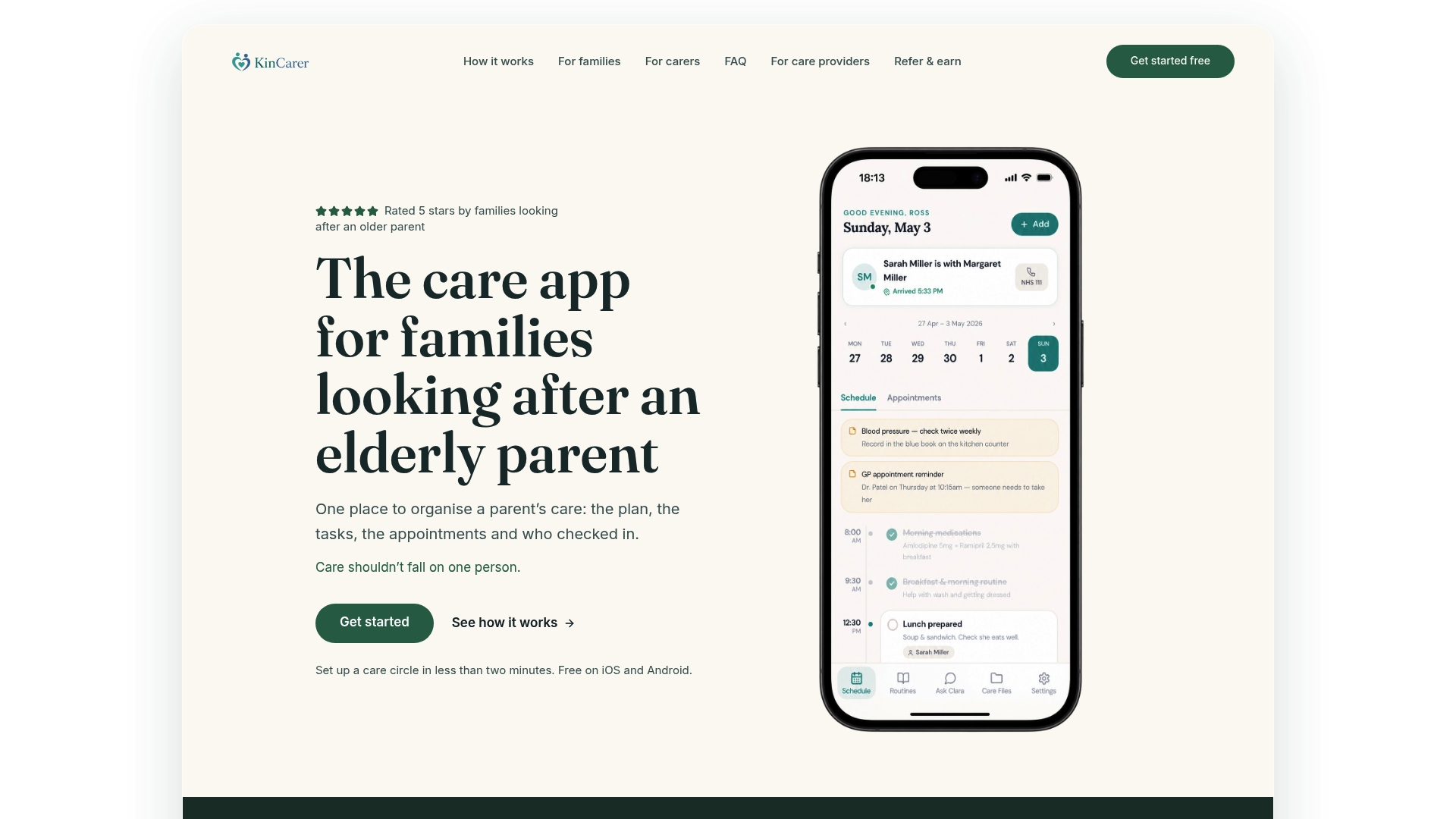
- Shared care circles for relatives and paid carers, with selective access for each.
- Task assignment, medication reminders and structured handovers in one view.
- Clara, our AI assistant, for searching and summarising what your family has recorded.
KinCarer starts with a 14-day free trial, then Family+ is available monthly or yearly. Care organisations can buy Family+ for the families they support. Visit the KinCarer product page to see how a care circle looks before inviting your family in.
FAQ
Who can see the notes in a family care circle?
Only the people you invite into your care circle can see its notes, and each person should have their own login rather than sharing one account, as NHS England’s guidance on sharing with unpaid carers recommends. You can choose what a paid carer sees separately from what family members see.
What should go into a shared handover note?
A useful handover records what was planned, whether it was done, what changed, who needs to know and what the next action is. This structured format is clearer than a free-text update and is easier to refer back to later, in line with NHS guidance on information sharing in social care.
How do we add a paid carer without sharing everything?
Agree in advance exactly what tasks and information a paid carer needs access to, then set that access individually rather than giving full visibility into the family’s private notes. Test the permissions and run a short trial period before relying on the arrangement day to day.
What if my parent can no longer give consent to share information?
Where a parent lacks capacity to consent, information can sometimes be shared in their best interests, but only when strict conditions are met, including an existing care relationship and no safeguarding concern, as outlined in NHS confidentiality guidance. It is worth discussing sharing preferences with your parent early, while they can still weigh in.
Does KinCarer cost anything to try?
KinCarer starts with a 14-day free trial, then Family+ is available monthly or yearly. Everyone invited to a care circle joins free. Organisations can buy Family+ for the families they support, with prices on the organisations page.