
Set Up in Under an Hour: Best Free Caregiver Apps for UK Families
UK families: compare free caregiver apps and use a safety first, one hour setup to share tasks, medication reminders, appointments, and handover notes.
By The KinCarer team ·
A practical starting point is a family care coordination app you can try free for 14 days, built around a shared care circle, where tasks, medication reminders, appointments and handover notes live in one place instead of scattered across texts and calendars. This single change helps reduce missed updates and shares the load across the family. We recommend trying a care coordination app built specifically for family use rather than clinical rota management.
TL;DR:
- Coordination apps are best suited for families sharing responsibility for tasks, appointments, notes, and document storage in one accessible platform.
- Free medication reminder apps depend on manual entry and verification, making it essential to confirm doses against prescriptions and keep only one person responsible for updates.
- Starting with a simple setup, such as logging upcoming appointments and current medication, helps ensure family members adopt the app without frustration.
- Many families use a combination of a coordination app and a dedicated medication app to handle general caregiving and complex medication routines separately.
- Privacy and data sharing policies should be reviewed, as free tiers often limit family size and storage, and app safety depends on proper verification of medication details.
Table of Contents
- How to choose a free carer app: a practical checklist
- Types of free apps carers use and when each helps
- Medication and safety: how to use free apps without creating risk
- Quick setup: get a family care circle working in under an hour
- How KinCarer helps families: features, adoption tips and limits
- Try KinCarer free for 14 days: what to expect and next steps
- A carer’s perspective on adopting tech
- FAQ
- Sources
How to choose a free carer app: a practical checklist
Not every app that claims to help carers actually fits how families work. Before you commit time to setting one up, run it against a short checklist.
- Shared tasks and reminders: can everyone see medication times, appointments and daily jobs in one feed?
- Handover notes: is there a simple way to log what happened today so the next carer isn’t starting from zero?
- Document storage: can you keep prescriptions, GP letters and emergency contacts somewhere everyone can find them?
- Permissions: does it let you set view only access for some relatives and edit access for others?
- Easy invites: can you add people with a link, or does it demand complicated account setup?
Free tiers usually cap the number of reminders, storage or family members you can add, so test with your actual circle size before trusting it long term. Check the privacy policy for how medical information is stored and whether data is shared with third parties.
Pro Tip: Set up the app with one real task, such as tomorrow’s GP appointment, rather than a test entry. You’ll feel the friction points immediately.
Types of free apps carers use and when each helps
Free tools for carers generally fall into a handful of categories, and knowing which one you need saves a lot of trial and error.
- Coordination apps centralise tasks, appointments, notes and sometimes documents, and work best when several family members share responsibility for an elderly parent.
- Medication reminder apps focus narrowly on dosage times and adherence, often with manual entry and a cap on free reminders before they ask for an upgrade.
- Shared calendars or messaging apps can be enough if only one or two people are involved and the main need is simply knowing when appointments fall.
- Condition specific apps, such as those used through NHS trusts for symptom tracking in oncology care, serve a narrower clinical purpose and sit alongside family coordination rather than replacing it. Careology, used in some NHS oncology settings, is one example of this kind of specialist tool.
For most families, a coordination app covers day to day organising, while a dedicated medication app fills in where dosing detail matters more than general task sharing. Many families end up running a coordination app for the household alongside a focused medication reminder tool for one person with a complex regimen. That combination avoids forcing a single app to do a job it wasn’t designed for, and it keeps the medication detail visible without burying appointments and handover notes underneath it.
Medication and safety: how to use free apps without creating risk
Free medication apps are useful reminders, not medical records. NHS guidance on medicines for carers notes that apps can help people remember to take medicines, but dosette boxes, pharmacist reviews or other methods may still be needed for complex regimes.
Most consumer medication apps rely on manual entry, according to guidance from the Independent Living Centre, which warns that these apps rarely connect to pharmacy records and so depend on the carer entering the right dose and frequency. That makes verification against the actual prescription essential, not optional.
To use these tools safely:
- Nominate one person as the verification lead if several relatives can edit medication entries.
- Photograph the prescription or packaging in the app rather than relying on memory for dosages.
- Set notifications for missed doses to go to a second carer, not just the person taking the medicine.
- Escalate to a GP or pharmacist when a regimen changes frequently or involves several medicines at once, rather than adjusting reminders yourself.
Quick setup: get a family care circle working in under an hour
A clear setup sequence makes the difference between an app that sticks and one that gets abandoned after a week.
- Nominate a primary organiser and gather the essentials: current medication list, upcoming appointments and emergency contacts.
- Invite family members by share link, setting view only access for some relatives and edit access for the people doing hands-on care.
- Create a handful of recurring tasks and one daily check-in, so the app earns its place in everyone’s routine from day one.
- Agree a simple handover note format and who gets alerted if something needs urgent attention.
Pro Tip: Follow up with less tech-confident relatives by phone within 48 hours of sending the invite. A quick call to confirm they’ve opened the app and seen one task does more for adoption than any tutorial.
How KinCarer helps families: features, adoption tips and limits
A good care coordination app brings together shared care circles, tasks, medication reminders, appointment tracking, handover notes and document storage, so everyone looking after an elderly parent works from the same information. Relatives and paid carers can be added to the same circle, with view or edit permissions set per person, which makes it straightforward to bring in a home care agency without losing family oversight.

Some care coordination apps include an AI assistant to help families search and summarise what’s already in the care circle, flagging gaps like a missing appointment note. These assistants do not give medical, legal or clinical advice: they work with the information entered, not as a substitute for a GP or pharmacist.
Try KinCarer free for 14 days: what to expect and next steps
If you’re trying to stop caring tasks living in scattered texts and sticky notes, starting with KinCarer gives your family one shared place for tasks, medication reminders, appointments and handover notes from day one. The 14-day free trial lets you test whether your family actually uses it before Family+ starts, monthly or yearly. Everyone you invite joins free.
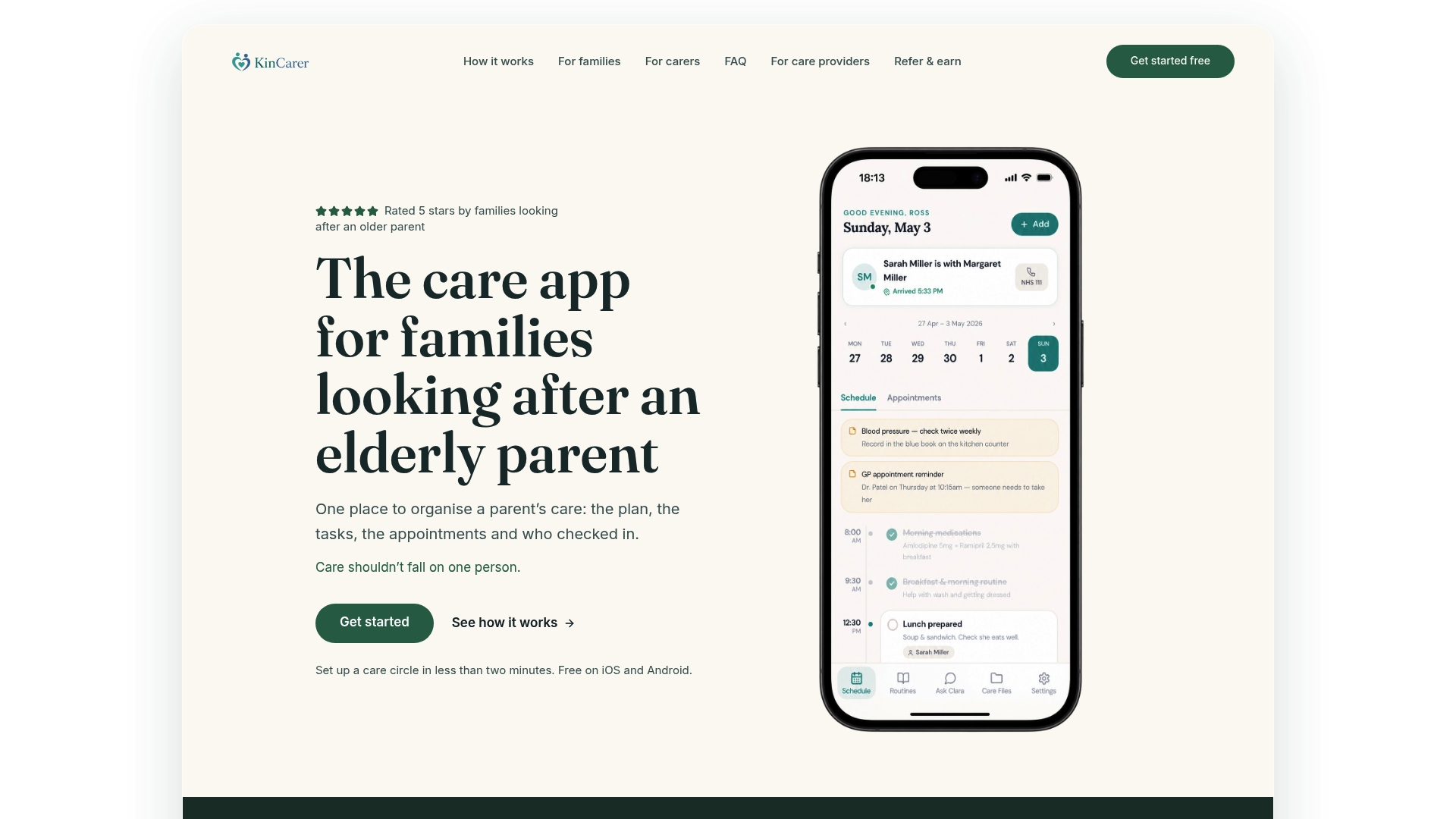
A simple way to evaluate it within an hour:
- Add your parent’s next three appointments and current medication list.
- Invite two family members with different permission levels.
- Log one handover note after a visit or call.
- Check whether everyone saw the update without you having to chase them.
When you’re ready to add paid carers or a wider family group, our organisations page explains how care circles extend beyond immediate family. You can start today from the KinCarer homepage.
A carer’s perspective on adopting tech

Families often resist a new app at first, usually because someone tried a complicated tool once and gave up. One family we’ve heard from got stuck for weeks until they stopped trying to migrate everything at once and just added a single recurring task: a Tuesday medication check. That one habit built enough trust to add appointments and notes later.
Start small. Pick one routine, not the whole care plan, and let it prove itself. If the adoption itself feels like the hardest part, Carers UK offers practical support that many families find useful alongside any app.
— KinCarer
FAQ
What is the best app to find carers?
Apps designed for finding and booking home care agencies are a different category from family coordination tools. For organising an existing family or paid care team, a shared care circle app such as KinCarer focuses on tasks, medication reminders and handover notes rather than sourcing carers.
What apps do carers use day to day?
Carers commonly use a mix of coordination apps for shared tasks and appointments, plus a dedicated medication reminder app for dosing detail. Carers UK also highlights simple tools like shared calendars and group messaging as practical low-tech options.
What are some good apps for helping elderly caregivers?
Family coordination apps that centralise tasks, medication reminders and handover notes help reduce the load on a single relative. Pharmacy-developed tools such as MindMeds also support medication and wellbeing tracking with features useful for sharing with carers.
What are some good caregiver scheduling apps?
A coordination app that lets you assign recurring tasks and appointments to specific family members works well for scheduling day to day care. Look for one with clear view and edit permissions, so secondary carers can check the schedule without accidentally changing it.
Are free caregiver apps safe for managing medication?
Free medication apps are useful as reminders, but NHS guidance on medicines for carers notes that complex regimens may still need dosette boxes or pharmacist reviews. Always verify entries against the actual prescription rather than relying on the app alone.