
Stop missed meds: Best care team apps for UK families, 8 features
Family first UK guidance on choosing care team apps by feature, privacy and cost. See the 8 features to check and try KinCarer with your family circle.
By The KinCarer team ·
A recommended approach for families coordinating an elderly parent’s care is to use an app that puts everyone’s updates, tasks and medication reminders inside one shared care circle instead of scattered across text threads. That single change stops details getting lost. Below, you’ll find the feature categories that matter most, a practical checklist for testing candidates, and a closer look at how KinCarer fits together.
TL;DR:
- An effective family care app must support shared care circles with role-based permissions to control access for different caregivers and helpers.
- Medication logging and reminders should be paired to prevent missed or doubled doses, with the ability to review past administrations easily.
- Apps should support recurring tasks and offline use to accommodate weekly routines and locations with poor connectivity.
- Privacy features must allow limiting what each user can see and easy revocation of access when caregiving arrangements change.
- Testing an app with just two family members during a trial helps identify permission gaps and ensures the platform fits the family’s communication style.
Table of Contents
- Feature categories every family care app should offer
- Privacy and security: what to check before you share personal details
- How to choose the right app for your family
- Setting up a family care circle in one sitting
- KinCarer spotlight: matching the checklist to a real app
- A carer’s perspective: the pitfalls families keep repeating
- Try KinCarer with your own family circle
- Sources
- FAQ
Feature categories every family care app should offer
A good family care app isn’t a to-do list with a health theme bolted on. It needs to cover the specific, repeating jobs that come with looking after an elderly parent: who’s picking mum up from the physio appointment, who last gave her the blood pressure tablets, and who’s meant to be checking in on Thursday.
The shared care circle is the foundation. It’s the one place where an adult child in another city, a sibling nearby, and perhaps a home care agency worker can all see the same information, rather than each holding a partial picture. From there, most useful apps build out into a handful of predictable areas.
Task assignment turns vague intentions (“someone should sort the prescription”) into a specific job with a name attached and a due date. Medication reminders and logging matter because missed or doubled doses are one of the most common and preventable risks in home care, and a shared log means the next person to visit knows what’s already been given. A shared calendar keeps appointments, respite bookings and family visits visible to everyone, so two people don’t turn up expecting to do the same school run. Notes and handover updates carry the context a task alone can’t: how mum seemed today, what the GP actually said, what to watch for tomorrow.
Different people in the circle tend to lean on different parts of this:
- The organiser, often the adult child carrying most of the mental load, uses tasks, calendar and handover notes daily.
- A sibling helping from a distance mainly checks updates and takes on specific assigned tasks.
- A neighbour or friend doing occasional check-ins needs simple, limited access, usually just the next task and a way to leave a quick note.
- A paid carer or home care agency worker needs medication logs and handover notes but rarely needs financial or legal documents.
Research on family caregiving burden suggests that carers benefit most from tools that make one person’s updates visible to the whole network, rather than from a long list of extra features nobody uses. A PMC analysis of caregiving burden found that structured supports and communication tools reduce the administrative weight that falls on family carers, largely by cutting down on repeated explaining and chasing.
Privacy and security: what to check before you share personal details
You’re about to put your parent’s medication list, appointment history and possibly financial notes into an app, so it’s worth spending ten minutes checking how that information is handled before anyone in the family starts typing.
Start with role-based permissions. A well-built app lets you decide, person by person, what each contributor can see and do: full access for you as the main organiser, task-and-note access for a sibling, and a narrower view for a paid carer who doesn’t need to see legal documents. If an app only offers one level of access for everyone invited, that’s a limitation worth noting before you commit a whole family’s information to it.

Look for a clear, readable privacy statement, not a wall of legal text that dodges the actual question of who can see what and where data is stored. Some providers reference recognised security standards such as ISO/IEC 27001, which sets out requirements for information security management systems. A mention of it isn’t proof of anything on its own, but it’s a useful signal that a provider has been through some external scrutiny of its data practices, and its absence is worth asking about directly.
Before you invite anyone, decide what they actually need to see. Most apps let you limit a paid carer or occasional helper to specific sections, rather than giving them the run of the whole care circle. Just as important is knowing how to remove access cleanly: when a carer’s contract ends or a helper steps back, you should be able to revoke their access in a couple of taps, without deleting the underlying records everyone else still needs.
How to choose the right app for your family
Once you understand what a good app should do, the choice comes down to matching features to your family’s actual situation, not the longest feature list.
- How many people need to contribute? A rota of one adult child and one sibling has different needs from a circle that includes three siblings and a home care agency.
- Does it support recurring tasks, not just one-off reminders, since most caring involves the same jobs weekly or daily.
- Are medication reminders paired with a log, so a missed or given dose is recorded, not just alerted.
- Can you use it offline or with a poor signal, which matters if a parent lives somewhere with patchy connectivity.
- Are permissions granular enough to let you limit what paid carers or occasional helpers can see.
- Does it include emergency contact details that are quick to find under pressure, not buried three menus deep.
- Is it available on the devices your family actually uses, since a circle only works if everyone can join it.
- What does it actually cost, including whether extra family members or carers push you into a higher tier.
Before you invite a paid carer or a home care agency into a shared circle, ask two direct questions: what will they be able to see, and what happens to their access when the arrangement ends. Most disputes over these apps come from unclear answers to exactly those two points.
A few patterns are worth treating as red flags. An app with no way to limit what a given member sees is one where you either share everything or nothing. One with no export or back-up option leaves you stuck if you ever need to move your family’s information elsewhere. And subscription pricing that only reveals extra charges once several family members are already invited tends to cost more than it first appears.
Pro Tip: Trial an app with just two people for a week before inviting the wider family. It’s far easier to spot gaps in permissions or task handling when you’re only untangling one relationship, not five.
Setting up a family care circle in one sitting
You don’t need a weekend to get a family care circle running properly. Most of the groundwork can be done in one focused session, ideally with whoever is closest to your parent’s day-to-day care.
- Create the circle and add your parent’s name, then invite the core contributors: yourself, siblings, and anyone else who regularly helps.
- Set roles and permissions for each person before they start adding anything, so a paid carer or occasional helper only sees what’s relevant to them.
- Enter recurring medications and appointments first, since these are the details people ask about most and the ones most easily missed.
- Add handover notes from the last week or two, even retrospectively, so new joiners aren’t starting from zero.
- Assign the first week’s tasks to specific people rather than leaving them unowned, which is usually where good intentions quietly fail.
Agree an update rhythm early: a short daily note after any visit, and a slightly longer weekly summary from whoever’s coordinating. A simple handover note template helps here, something as basic as “what happened, what’s changed, what’s next” keeps entries quick to write and quick to read.
Not everyone will join smoothly. If a relative can’t install the app, check whether there’s a version for their device or a simpler view they can access from a browser. If someone declines to join at all, often an older sibling reluctant to learn “another app”, it usually helps to have one other family member relay their updates by phone for the first few weeks rather than pushing the point. Most people come round once they see how much less chasing everyone else is doing.
KinCarer spotlight: matching the checklist to a real app
Some apps are built specifically for the situation this guide describes: a family, not a care home or a clinical team, trying to coordinate an elderly parent’s care without one person carrying the whole load.
Examples of app features that match the checklist include:
- A shared care circle with role-based permissions, so relatives and paid carers can be invited into the same space with different levels of access.
- Task assignment that lets you set recurring and one-off jobs with a named owner and due date.
- Medication reminders and logging, so a dose given is recorded, not just alerted and forgotten.
- Handover notes and check-ins that carry context between visits, not just a list of ticked boxes.
- Document storage for things like GP letters or care plans, kept in one place rather than scattered across e-mail.
- Emergency contact management, so the details that matter under pressure are easy to find.
- An optional AI assistant which helps families search and summarise what’s in their care circle without giving medical, legal or clinical advice.
The number of family carers supporting older adults rose substantially between 2011 and 2022, according to a Johns Hopkins Bloomberg School of Public Health analysis, a shift that has left more households juggling the same coordination problems this guide sets out to solve.
A typical trial setup looks like this: three siblings split their mother’s care after a hospital discharge. One creates the circle and adds recurring appointments and medications. Each sibling is assigned specific weekly tasks: one handles prescriptions, another handles GP appointments, the third does weekend check-ins, and all three can see the same handover notes without a single group chat message.
A carer’s perspective: the pitfalls families keep repeating
The same coordination failures turn up in most families, whatever their situation. One sibling assumes another has booked the follow-up appointment. Nobody’s sure whether mum actually took her afternoon tablets or whether two people gave them by mistake. A visiting carer leaves useful information in a paper notebook that only the next visiting carer ever reads.
None of this happens because families don’t care enough. It happens because there’s no single, visible record that everyone can check without asking. An app used properly closes that gap, not by adding more communication, but by making the existing updates visible to everyone at once.
The apps help most when paired with a few habits that cost nothing: agree who owns which area of care, even loosely, so tasks don’t default to whoever answers the phone first. Keep daily updates short, a sentence is often enough. And settle on one place for documents and notes, rather than letting the “real” information live half in an app and half in someone’s memory.
Trial any app for two or three weeks before deciding it’s the right fit, and review it together as a family rather than letting one person make the call alone. Coordination tools only work when everyone actually uses them.
— KinCarer
Try KinCarer with your own family circle
If you’ve read this far weighing up separate apps for tasks, medication and updates, Some apps offer the advantage of combining tasks, medication and updates from one shared circle, so nobody has to check multiple places to know what’s happening with a parent’s care.
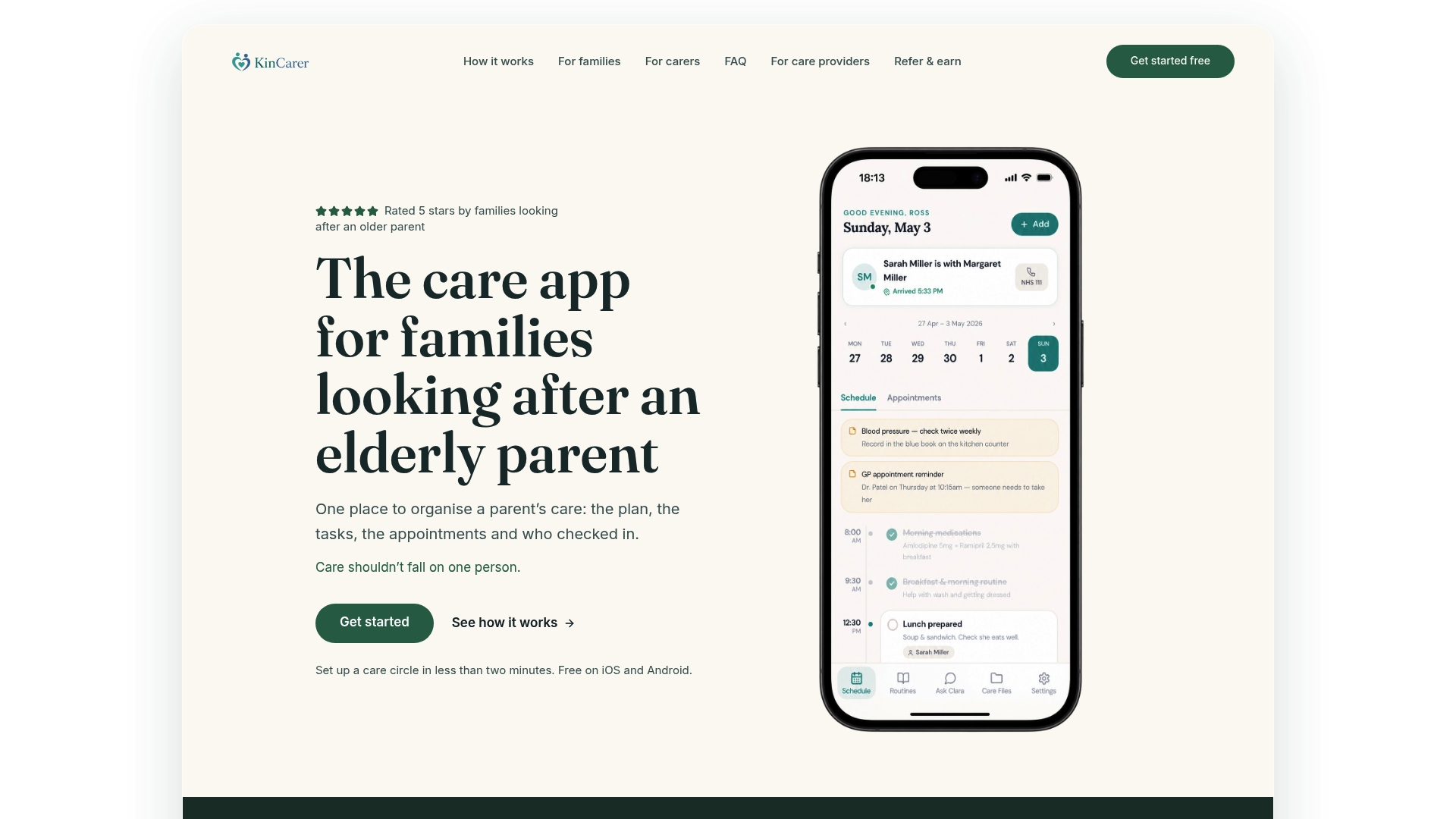
During a trial, it’s worth testing the basics that matter most: invite one relative, set up one recurring medication reminder, and schedule one repeating task such as a weekly check-in call. That’s usually enough to tell whether the app fits how your family actually communicates.
- Compare what you find against the checklist earlier in this guide before you subscribe to anything.
- Visit the KinCarer product page to see Family+ and start the 14-day free trial.
- If your family’s care involves a paid provider or sponsored access, the KinCarer organisations page covers Family+ options for that setup.
Complementary tools are worth knowing about too: Noise is a useful example of general collaborative tools some families layer on top for wider family communication.
Sources
- Number of family caregivers supporting older adults increased nearly one‑third between 2011 and 2022 — Johns Hopkins Bloomberg School of Public Health
- Research on family caregiving burden and interventions — PMC article
- ISO/IEC 27001 information security standard — ISO
- CaringBridge — About and platform
FAQ
What are some good apps for care workers?
Care workers typically use apps built for logging visits, recording tasks completed and communicating with the family they’re supporting, rather than full clinical systems. A shared family care app like KinCarer can serve this purpose informally, giving a paid carer a limited view of tasks, medication logs and handover notes without exposing the whole family’s private information.
What is the best app for family carers?
There’s no single official ranking, but families coordinating non-clinical care generally look for an app with a shared circle, task assignment, medication logging and role-based permissions in one place. Some apps are built specifically around that combination for families managing an elderly parent’s care.
What is the best caregiver app?
The right choice depends on whether you need clinical monitoring, general updates, or day-to-day task coordination among family members. For families organising shared, non-clinical care such as appointments, medication reminders and handover notes, an app built around a shared care circle, like KinCarer, tends to fit better than a communication-only platform such as CaringBridge.
What are the 5 most used apps among family carers?
There’s no verified, published ranking of the most used family caregiving apps specifically. Families commonly rely on a mix of general messaging tools, shared calendars, and dedicated coordination apps that cover tasks, medication reminders and handover notes together.