
Work With NHS Proxy Access: Caregiving App Features UK Carers Need
Practical UK guide to caregiving app features that cut admin, prevent missed meds, and work alongside NHS proxy access. KinCarer setup tips.
By The KinCarer team ·
The features that matter most in a family caregiving app are a shared care calendar, task assignment, medication tracking, group chat with handover notes, secure document storage and controllable permissions. Together, these stop updates getting lost in a WhatsApp thread and spread the organising across more than one person. KinCarer, for example, builds its whole structure around a shared “care circle” that puts every relative and paid carer on the same page.
TL;DR:
- Shared care calendars should be synchronized with personal devices to ensure visibility of appointments and reduce scheduling conflicts among family members.
- Task assignment and urgent flags help prevent duplicate efforts, such as multiple people calling the GP or overlapping medication doses.
- Permission controls and encrypted storage are essential to safeguard sensitive health information and prevent unauthorized access by paid carers or other family members.
- The app should support cross-platform functionality and accessible design, enabling participation from family members with differing devices and technical confidence levels.
- Clear separation between emergency alerts and routine task flags ensures urgent issues are prioritized without causing alert fatigue or false alarms.
Table of Contents
- What are the must-have features for caregiving apps?
- Why do these features matter for carers day to day?
- How does an app fit alongside NHS proxy access?
- How do you choose and set up a caregiving app with your family?
- How KinCarer puts these features into practice
- What should you know about emergency alerts and SOS features?
- Do caregiving apps offer GPS tracking and location sharing?
- Does the app work across different phones and devices?
- Is the interface actually usable for family members who aren’t tech-confident?
- How secure is the data in a caregiving app, and does it meet healthcare regulations?
- Can you customise alerts so the app doesn’t become noise?
- Technology helps you cope, but it doesn’t replace being there
- Try KinCarer: what to expect in your first week
- Sources
- FAQ
What are the must-have features for caregiving apps?
Every family’s situation looks different, but the features that Carers UK identifies as genuinely useful for online tools to help with caring tend to fall into the same handful of categories. Here’s what each one actually does when you’re using it on a Tuesday evening, not just in theory.
- Shared care calendar. You add your mum’s physiotherapy appointment once, mark it as repeating every fortnight, and everyone in the circle sees it. Some apps let you sync the whole schedule to your phone’s own calendar, so a hospital visit sits next to your work meetings instead of living in a separate world.
- Tasks and assignment. Recurring chores (bins, prescription collection, grocery drops) get assigned to a named person rather than floating as a vague hope that “someone” will sort it. Flagging a task as urgent makes it stand out, which matters when a boiler repair suddenly outranks the weekly shop.
- Medication tracking. Reminders for doses, a simple history of what’s been taken, and the option to photograph a new box of tablets so everyone recognises it. This sits alongside, not instead of, formal prescription tracking.
- Circle chat and notifications. One conversation for the whole care circle, separate from the schedule, for the photos and updates that don’t fit a calendar entry. A read receipt or an attention bell showing what you haven’t seen yet stops you from missing something buried three days back.
- Handover notes and care logs. Short, time-stamped updates, sometimes with a photo attached, so the next person visiting knows what happened and what to watch for.
- Document and photo vault. Discharge letters, care plans, power of attorney paperwork and similar documents, stored somewhere more secure than an email inbox.
- Permissions and access. Control over who sees what, particularly useful when a paid carer from a home care agency only needs visibility of their own shifts, not the whole family’s private conversation.
Why do these features matter for carers day to day?
Shared visibility stops the classic problem of two siblings both ringing the GP surgery the same afternoon, or nobody realising a repeat prescription lapsed three weeks ago. Centralised medication reminders with a photo record lower the risk of a missed or doubled dose, particularly when more than one person is involved in giving tablets. After a hospital discharge, a clear handover note written once and read by everyone beats five separate phone calls repeating the same information badly.
There’s a quieter benefit too. When one person stops being the only one who knows what’s going on, sibling resentment tends to ease, and the primary carer feels less isolated carrying the emotional weight alone.
Pro Tip: Agree as a family which feature you’ll adopt first, medication or the calendar, rather than trying to switch everything over in one go. A partial habit that sticks beats a perfect system nobody opens after week two.
How does an app fit alongside NHS proxy access?
A caregiving app and NHS clinical access are not the same thing, and mixing them up causes confusion. The NHS App’s national proxy service lets an authorised carer order repeat prescriptions or book GP appointments, but only once the relative’s GP surgery has verified that access. A family coordination app sits alongside that, handling the day-to-day organising the NHS system was never built for.
Consent matters in both directions. Before sharing clinical information with family, professionals need the patient’s consent or a recognised lawful representative arrangement, and the same principle should guide what you put in a shared app. NHS England has piloted a family access feature in the NHS App designed to make switching between your own profile and a relative’s as straightforward as changing a streaming profile, cutting the admin burden on GP practices.
A few checks before you rely on any app for sensitive information:
- Look for encrypted storage and granular permissions, not a general chat app with no access controls.
- Avoid keeping medication lists or legal documents in an unencrypted group thread, where there’s no audit trail of who saw what.
- Use NHS prescription tracking and your caregiving app together. One handles the clinical order, the other keeps the family informed that it happened.
How do you choose and set up a caregiving app with your family?
Pick features to match your actual pinch points, not every option an app offers. If missed appointments are the real problem, start there.
- Decide which outcomes matter most, appointments, medication or handovers, and prioritise accordingly.
- Invite the relevant people, set permission levels, and agree who acts as the main coordinator.
- Trial a full week of shared use before judging whether it works for your family.
- Set up recurring tasks and urgent flags, and sync the calendar to personal phones.
- Agree simple rules for what goes in the app versus what warrants an actual phone call.
- Check accessibility settings and language options, and keep a backup export of anything important.
How KinCarer puts these features into practice
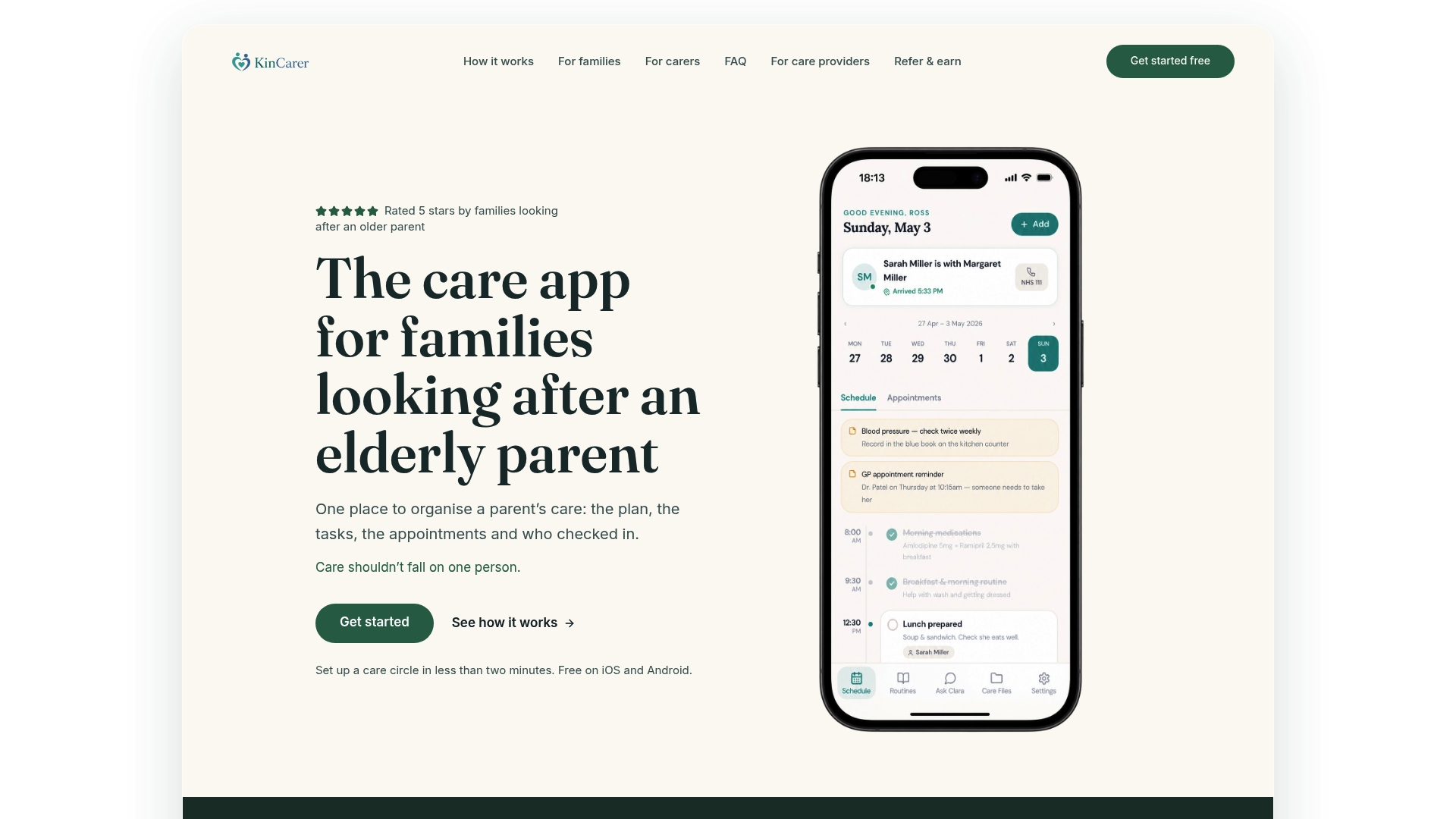
KinCarer builds a shared care circle where relatives and paid carers work from the same information rather than scattered messages. Circle Chat holds the conversation for photos and updates that don’t belong on the schedule, with a bell that gathers unseen items so nothing sits buried. The calendar syncs to your phone, handover notes can carry a photo, urgent tasks get flagged clearly, and permissions let a home care agency’s staff see only their own visits if that’s what the family wants.
Clara, KinCarer’s optional AI assistant, helps you search and summarise what’s already in your care circle. Clara does not give medical, legal or clinical advice.
What should you know about emergency alerts and SOS features?
An SOS or emergency alert feature typically lets someone in the care circle flag a genuine crisis instantly, cutting through the usual scroll of daily updates. The distinction that matters is between an urgent flag for a task (a leaking tap, a missed delivery) and an actual emergency signal that something has gone seriously wrong.
Coordination apps are not a substitute for 999 or a personal alarm pendant service. Where a relative has a fall risk or a known medical condition that could deteriorate quickly, a dedicated telecare alarm remains the right tool for a genuine emergency, because it connects to a monitoring centre around the clock. What an app-based alert does well is the layer just beneath that: marking a task or note as urgent so it jumps to the top of what the family sees, rather than sitting in a long list of routine updates.
When you’re setting up a care circle, agree in advance what counts as urgent enough to flag in the app and what warrants an immediate phone call instead. Families who skip this conversation often find urgent flags lose their meaning within a few weeks, either overused for minor things or underused because nobody trusts the system to get seen quickly enough. A simple family rule, something like “urgent flag for anything that needs sorting today, phone call for anything that needs sorting now”, keeps the distinction useful.

Do caregiving apps offer GPS tracking and location sharing?
Some caregiving and family-safety apps include location sharing, letting relatives see roughly where a person is, which can matter for someone living with dementia who occasionally wanders. This is a genuinely sensitive feature, and it sits at a different level of intrusion to a shared calendar or a chat thread.
Before switching on any location feature, think about consent properly. A parent with full mental capacity has every right to decline being tracked, and doing so anyway, even with good intentions, damages trust in a way that’s hard to repair. Where capacity is in question, families often involve a GP or a social worker in that conversation rather than deciding alone.
If location sharing is appropriate for your situation, treat it as one tool among several rather than a replacement for a wellbeing check or a phone call. Battery life, signal gaps and a phone left at home all limit how reliable GPS tracking actually is in practice, so don’t build a false sense of security around it.

Does the app work across different phones and devices?
Most families caring for a relative are not using matching phones. One sibling has an iPhone, another an older Android handset, and the parent themselves might have a basic device or none at all. A caregiving app needs to work identically across iOS and Android, because insisting everyone buys the same phone brand simply is not realistic.
Check that the app runs as a proper mobile app on both platforms rather than a mobile version being an afterthought bolted onto a desktop product. Web access matters too, particularly for a sibling who prefers checking updates from a laptop during a work break rather than pulling out a phone. The person actually being cared for often doesn’t need the app installed on their own device at all, since most of the coordinating happens between the family members and carers around them.
Is the interface actually usable for family members who aren’t tech-confident?
A caregiving app is frequently opened by people who wouldn’t call themselves technical, an adult child juggling three tabs during a lunch break, or an older sibling who’s never used anything more complex than online banking. If an app needs a tutorial to add an appointment, it has already failed its core purpose.
Look for large, readable text, a small number of clearly labelled screens (calendar, tasks, chat, documents) rather than a maze of settings, and the ability to add something, an appointment, a note, a photo, in two or three taps at most. Accessibility options matter more than they might first appear: adjustable text size for a family member with weakening eyesight, and straightforward navigation for anyone managing this alongside their own health issues or fatigue from disturbed sleep. A cluttered interface doesn’t just annoy people, it actively discourages the less confident member of the family from contributing, which quietly puts the organising back on one person’s shoulders.
How secure is the data in a caregiving app, and does it meet healthcare regulations?
Health-adjacent information, medication names, discharge letters, a description of a new symptom, deserves the same treatment as banking details, not the casual handling of a group chat photo. UK guidance on proxy application services recommends dedicated, password-protected apps with strict access controls rather than storing sensitive health data in general messaging threads, which typically lack audit logs or fine-grained permission settings.
HIPAA is a US regulation and does not apply to UK families, so a caregiving app operating in the UK isn’t required to comply with it. What matters here instead is UK data protection law, encrypted storage, and the kind of granular permission system covered earlier, letting you control exactly who sees what inside the app. Look for an app that states clearly how data is stored and encrypted, offers an audit trail of who accessed or edited what, and gives you the ability to remove someone’s access instantly if circumstances change, a paid carer’s contract ending, for instance.
Can you customise alerts so the app doesn’t become noise?
Notification fatigue is a real risk with any shared app, and it undoes the whole point if everyone starts muting it within a fortnight. Customisable alert preferences let each person in the circle decide what actually needs a push notification, a new chat message, an urgent task, a medication reminder, versus what can wait to be checked when they next open the app.
Different family members want different things. A daughter who lives five minutes away might want every update in real time; a son overseas might prefer a daily digest so his phone isn’t buzzing through his own working hours. A well-designed app lets each person set their own threshold rather than forcing one blanket setting on the whole circle. The best systems also separate types of alert, so a genuinely urgent flag still gets through even when someone has muted routine chat notifications, which matters more than it sounds when the one message that needed attention is the one that got silenced along with everything else.
Technology helps you cope, but it doesn’t replace being there
Digital tools genuinely lighten the admin, but they cannot replace a hand held or a familiar voice on the phone. Adopt features gradually rather than all at once, so the person you’re caring for isn’t overwhelmed by sudden change. And where any decision touches on clinical care, loop in the GP or a care professional rather than deciding alone in an app.
— KinCarer
Try KinCarer: what to expect in your first week
If the feature list above matches what your family actually needs, KinCarer is built around exactly that combination: a shared care circle, Circle Chat for the messages that don’t belong on a schedule, calendar sync, medication reminders, handover notes with photos, and permissions that let a paid carer see only their own shifts if that suits your family. Clara, the built-in AI assistant, helps you search and summarise what’s already in the circle without giving medical or legal advice.
KinCarer is now available in German, French and Spanish as well as English, useful if your family includes relatives who’d rather read updates in their first language. For your first week, try inviting everyone into the circle, agreeing one coordinator, adding your mum or dad’s regular appointments, and setting up medication reminders before anything else. Start with the 14-day free trial, then Family+ monthly or yearly, or explore organisational options if you’re setting this up through a care provider rather than as a single household.
Sources
- Online tools to help with caring | Carers UK
- Digital
- NHS App’s family access feature “as simple as switching Netflix profiles” | NHS England
FAQ
What is the best app for family carers?
There’s no single “best” app, since families prioritise different features, but Carers UK highlights shared calendars, medication tracking and secure document storage as the core features worth checking for. KinCarer covers this combination through its shared care circle, with subscription pricing details available on their website.
What is the best app for carers in the UK?
The right choice depends on whether you need coordination between family members, clinical access through the NHS, or both. Carers organising day-to-day tasks, appointments and handovers typically want a dedicated coordination app, while clinical actions like ordering repeat prescriptions go through the NHS App’s proxy access once a GP surgery has verified it.
What is caregiver burnout syndrome?
It refers to the physical and emotional exhaustion that builds up when someone carries caring responsibilities for a long period, often worsened when they feel solely responsible with little support. Symptoms typically include persistent tiredness, irritability, and a sense of being unable to switch off from the caring role.
What are common reasons for sibling resentment in caring?
Resentment usually builds when one sibling ends up carrying most of the practical load while others feel excluded from decisions, or vice versa, when one sibling feels shut out of what’s actually happening. Shared visibility of tasks, appointments and updates, the kind a coordination app provides, tends to reduce this because everyone can see the same information rather than relying on secondhand accounts.