Make NHS Visits Count: KinCarer and Family Care Apps for UK Carers
UK family carers: compare family care apps, check privacy, and see how KinCarer keeps tasks.
By The KinCarer team ·
Use a family care planning app to cut the admin load of caring for an ageing parent, and start with a family care planning app if you want shared care circles, medication reminders and handover notes in one place. The right app gives every relative and paid carer the same picture of what has happened and what still needs doing. It will not replace a statutory needs assessment or a doctor’s judgement, but it will stop vital details getting lost between siblings, carers and appointments.
TL;DR:
- Shared care circles should include role-based access controls to ensure that each caregiver sees only relevant information, such as medication logs or financial details.
- Medication management features must include timed reminders with confirmation, logging of missed doses with reasons, and observation notes to provide full safety oversight.
- Exportable summaries and audit trails are essential for clinical visits and dispute resolution, helping families and healthcare providers access accurate, organized records quickly.
- Privacy checks should confirm data storage locations, role-based permission revocation, audit logs, and emergency access options before uploading sensitive information.
- Effective onboarding can be completed within a week by creating a profile, inviting key relatives, setting up initial tasks, uploading critical documents, and scheduling weekly family reviews.
Table of Contents
- What features actually matter in the best aging parent apps?
- Which medication and safety features should you check first?
- How do you coordinate with paid carers and the NHS through an app?
- What privacy and security checks should you make before uploading anything?
- How to choose the right family care app: a decision checklist
- How do you set up a care app and start using it this week?
- Does using an app actually reduce the admin burden of caring?
- What should you expect from customer support?
- What do user reviews and ratings actually tell you?
- How long does onboarding actually take, step by step?
- Author perspective: why family-centred design matters
- Getting started with KinCarer
- Sources
- FAQ
What features actually matter in the best aging parent apps?
Not every app marketed at families does the same job. Some are glorified to-do lists with a health theme bolted on. Others are built specifically around the messy, shared reality of caring for someone else’s parent alongside your own life.
Here is what genuinely reduces workload and risk, rather than just looking tidy on an app store listing.
- Shared care circles with role-based access. Your sister needs to see the medication log; your neighbour who does the school run twice a week probably does not need to see bank details.
- Task assignment and recurring tasks. Weekly shopping, fortnightly GP repeat prescriptions, monthly bill payments — recurring tasks stop the same conversation happening every week (“has anyone booked the chiropodist yet?”).
- Handover notes that read like a nurse’s handover, not a WhatsApp thread. A quick note like “Mum seemed more breathless after lunch, slept most of the afternoon” is far more useful buried in a searchable log than lost in a group chat with forty other messages.
- Appointment tracking with an exportable summary. Being able to print or export a clean record before a GP visit changes what that ten-minute appointment can achieve.
- Medication reminders with a logging function, not just a push notification that gets dismissed and forgotten.
- A document vault for power of attorney papers, insurance details, and emergency contacts, so nobody is searching a shoebox at 2am.
Usability matters more than feature count. An ageing parent who struggles with a smartphone does not need to use the app themselves for it to work. Most families set it up so the parent is the subject of the care circle, while relatives and any paid carer do the actual updating.
Pro Tip: Before committing to any app, do a five-minute test with your mum or dad present. Show them what you’re logging and why. Even if they never open the app themselves, knowing what’s being recorded (and why) tends to reduce resistance to the whole idea.
Look for an audit trail too. If three people are updating the same care circle, you want a record of who changed what, and when, particularly if a decision about medication or a hospital visit is ever questioned later.
Which medication and safety features should you check first?
Medication is where coordination gaps cause the most stress, and the most risk. A missed dose because two people both assumed the other had given it, or a double dose because nobody checked the log, is exactly the kind of error a shared app is designed to prevent.
When comparing apps, run through this checklist:
- Timed reminders with confirmation. The reminder should let whoever gives the medication mark it as done, visible to the whole care circle in real time.
- Missed-dose records, not just missed-dose alerts. A silent gap in the log is far less useful than a flagged note explaining why a dose was skipped (parent refused it, was asleep, was at a hospital appointment).
- Symptom and observation logging alongside medication. Noting “new medication started Tuesday, more confused by Thursday” next to the dose record turns a vague worry into something a GP can act on.
- Exportable logs for hospital discharge or clinical review. A printed or PDF summary of the last fortnight’s doses and observations is far more useful to a ward doctor than a family member trying to recall it from memory.
Unpaid carers already spend a significant amount of time managing the system around care rather than the caring itself. One recent study found the burden of managing care-system bureaucracy can reach up to 220 hours a year for a single unpaid carer. Medication logging that exports cleanly saves a meaningful slice of that time by removing the need to reconstruct records from memory before every appointment.
Ask directly what an app’s clinical disclaimer says. A good app will be explicit that reminders and logs support your own judgement and your parent’s care team, not a substitute for either. Clara, KinCarer’s in-app assistant, is built on that principle: it can summarise what is already in the care circle, but it does not give medical or legal advice.
How do you coordinate with paid carers and the NHS through an app?
Most families are not managing care alone. A home care agency, a district nurse, a GP surgery and two or three relatives are often all touching the same person’s care in the same fortnight, usually without seeing each other’s notes.
An app earns its place here by becoming the single master record everyone updates instead of duplicating.
- Invite paid carers with limited access. They can see today’s tasks and log what happened during a visit without seeing family financial documents or legal papers.
- Keep one person as the master record holder, usually the primary family carer, who reviews entries and resolves any conflicting notes.
- Build a GP consultation pack from recent entries. Pull together the last two weeks of medication doses, observations and any incidents into a short, printable summary before an appointment.
- Use the record to settle disputes calmly. If a paid carer’s visit notes and a relative’s phone call disagree about how mum was on Tuesday, a dated log entry settles it faster than a memory-based argument.
Private home care in the UK typically runs between £15 and £30 an hour, which makes it worth knowing exactly what each paid visit achieved rather than relying on a verbal handover at the door. A shared log turns that cost into something families can actually audit, rather than just trusting it happened as described.
Set permissions deliberately rather than defaulting to “everyone sees everything.” A paid carer generally needs today’s tasks and a place to log observations; they rarely need years of family history.
What privacy and security checks should you make before uploading anything?
Before you put a single document into any app, read the privacy policy properly, not just the summary. You are uploading medication histories, sometimes financial details, and sensitive personal information about someone who has not necessarily consented to every relative seeing it.
Four checks matter more than the rest:
- Where is the data stored, and is any of it shared with third parties? A privacy policy should state this plainly rather than burying it in general terms.
- Can you set role-based permissions, and revoke them instantly? If a relationship changes, or a paid carer’s contract ends, you need to remove access in seconds, not by emailing support.
- Is there an audit log of exports and access? Knowing who viewed or downloaded a document, and when, matters if sensitive information is ever disputed.
- What are emergency access provisions? If the primary carer is unreachable, is there a sensible fallback so care is not disrupted?
Pro Tip: Treat any AI assistant built into a care app the same way you’d treat a well-meaning but unqualified friend: useful for pulling together what you already know, never a substitute for a GP or solicitor’s actual advice.
Kincarer’s Clara assistant, for example, is designed to search and summarise information already sitting in your care circle. It will not diagnose a symptom or interpret a legal document, and any app that implies otherwise deserves a harder look.
How to choose the right family care app: a decision checklist
Picking between apps is less about feature lists and more about whether your specific family will actually use it in six months’ time. Run through these questions before committing to any subscription.
- Does your parent understand what’s happening, even if they never open the app? Test a basic task, like a medication reminder, with them present.
- Can you invite more than one relative and a paid carer, with different access levels? Single-user apps quickly become a bottleneck for one exhausted person.
- Can you export a clean, printable summary for a GP appointment? Ask specifically about PDF or print formats, not just in-app viewing.
- What does the free tier actually include, and what sits behind a paid subscription? Many apps offer solid free features for a single carer, then require an upgrade once a second or third family member joins.
- What does customer support look like, and how quickly can you get help during onboarding? A slow response in week one is a strong signal of what to expect during a genuine crisis.
- Is the app funded by advertising, and is the privacy policy vague about data sharing? If you cannot tell how the app makes money, be cautious about what you upload.
None of these questions have a universally right answer. A family managing dementia care with three siblings and a home care agency needs different things to a single adult child helping a fairly independent parent with appointments and paperwork.
How do you set up a care app and start using it this week?
Getting started does not require a weekend. Most families can have the basics running within a single evening and see the real benefit within a fortnight.
- Create the primary profile and invite one trusted relative. Add a paid carer too, if one is already involved.
- Add three immediate tasks: the next medication due, the next appointment, and a weekly check-in slot.
- Upload the documents you’d grab in an emergency — GP details, current medication list, power of attorney if it exists.
- Do a test run of reminders with your parent present, so they know what’s happening and why.
- Set a fixed weekly 10 to 15 minute family check-in to review what’s logged and catch anything drifting out of date.
Pro Tip: Put the weekly check-in in a shared calendar as a recurring event before you do anything else. The apps that fail in families are almost never the ones with the wrong feature set. They’re the ones nobody kept updating.
Does using an app actually reduce the admin burden of caring?
The scale of the problem is well documented. Unpaid carers can lose up to 220 hours a year to care-system bureaucracy alone, separate from the caring itself.
Care experts describe the wider health and social care system as fragmented, with unpaid family carers effectively acting as the connective layer holding it together. The most effective tools, according to Kings Fund research summarised by care specialists, are the ones that actively support liaison between family, GPs, hospitals and paid agencies rather than sitting apart from that network.
That is precisely why exportable records and audit trails matter so much at discharge or during a rushed clinical appointment. An app that only makes care visible within the family solves half the problem. One that exports cleanly to a GP solves the other half.
What should you expect from customer support?
Support quality often reveals more about an app than its feature list. A carer setting up medication reminders at 11pm after a difficult day needs a response that actually helps, not a ticket number and a three-day wait.
When evaluating support, look for a genuine help centre with clear, searchable guidance rather than a single FAQ page. Check whether support is available by email at minimum, and whether response times are stated anywhere rather than left vague. Onboarding help matters particularly for families where one relative is confident with technology and another is not. An app worth using should make it straightforward for the less confident person to be shown, in plain terms, how to check a task or read a note, without needing the more technical relative to do it for them every time.
It is also worth checking whether an app has documentation aimed specifically at inviting a paid carer or a home care agency into the circle, since that is a different onboarding journey to inviting a sibling. Apps built primarily for institutional rota management often handle this badly, because family invitations were never their core design problem.
Response speed matters less than clarity. A support answer that actually resolves the question in one reply beats a fast but generic response that sends you back to a help article you have already read.
What do user reviews and ratings actually tell you?
Star ratings alone are a poor guide when choosing a care app, because a five-star rating from someone who used an app for a fortnight tells you far less than three-star reviews written by someone who has used it for eighteen months across a full care journey.
Read reviews with a specific lens: does the reviewer mention using the app with more than one family member, or with a paid carer? Reviews from single users tend to praise features that matter far less once three or four people are relying on the same record. Look, too, for reviews that mention GP appointments or hospital discharge specifically, since those comments tell you whether the export and summary features hold up under real pressure rather than just looking good in a demo.
Negative reviews are often more informative than positive ones. A pattern of complaints about notifications not syncing between family members, or about support being unresponsive during onboarding, is a genuine warning sign worth weighing against any marketing claims. A single angry review about a missed feature matters less than several reviews describing the same specific problem.
Treat app store ratings as one input, not the deciding factor. A family’s needs, particularly around how many people need access and how technically confident everyone is, will shape what “good” looks like far more than an aggregate score ever can.
How long does onboarding actually take, step by step?
Onboarding a family care app follows a fairly predictable shape, and knowing the timeline in advance stops it feeling like an endless task.
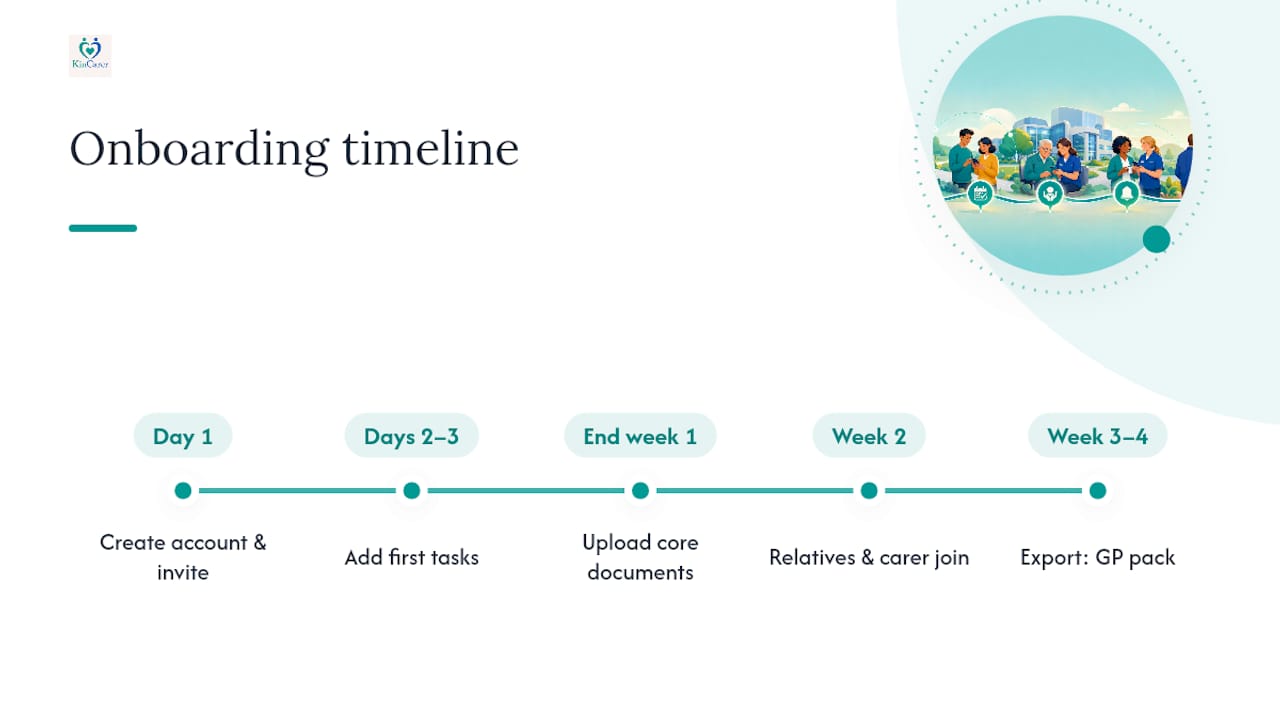
Day one is account creation and inviting the first relative. This takes minutes, not hours. Days two to three typically involve adding the first real tasks: the next medication dose, the next GP appointment, and any recurring weekly jobs like shopping or bill payments. By the end of the first week, most families have uploaded the core documents they’d want in an emergency, GP contact details, a current medication list, and any legal papers already in place.
Week two is where the habit either forms or doesn’t. This is when a second or third relative typically joins, and when a paid carer might be invited if one is involved. It is also the point at which the weekly family check-in either becomes a fixture or quietly falls away.
By roughly week three or four, most families have their first genuinely useful export ready, a GP consultation pack pulled together from real logged entries rather than guesswork. That milestone, more than any onboarding screen, is usually the moment an app proves its worth.
Author perspective: why family-centred design matters
Most care technology was built for institutions first and families as an afterthought. That ordering shows. Rota software designed for a care agency’s staffing needs handles a daughter, a son-in-law and a home care worker sharing one elderly parent’s care badly, because it was never the problem it set out to solve.
KinCarer starts from the opposite direction: a shared care circle where the default question is “who in this family needs to see this, and who doesn’t?” rather than “how do we manage a workforce?” That distinction shapes everything from onboarding to permissions to Clara, the in-app assistant that summarises what’s already recorded rather than pretending to offer clinical or legal judgement it was never built to give.
None of this replaces a proper needs assessment or a GP’s diagnosis. It simply means fewer things fall through the gaps between them.
— KinCarer
Getting started with KinCarer
KinCarer covers much of the checklist this guide has just walked through: a shared care circle, tasks and appointments, medication reminders, handover notes and care files for documents. Some include a built-in assistant that helps you search and summarise what’s already in your care circle so you’re not scrolling back through weeks of notes before a consultation, though it stops short of giving medical or legal advice, by design.
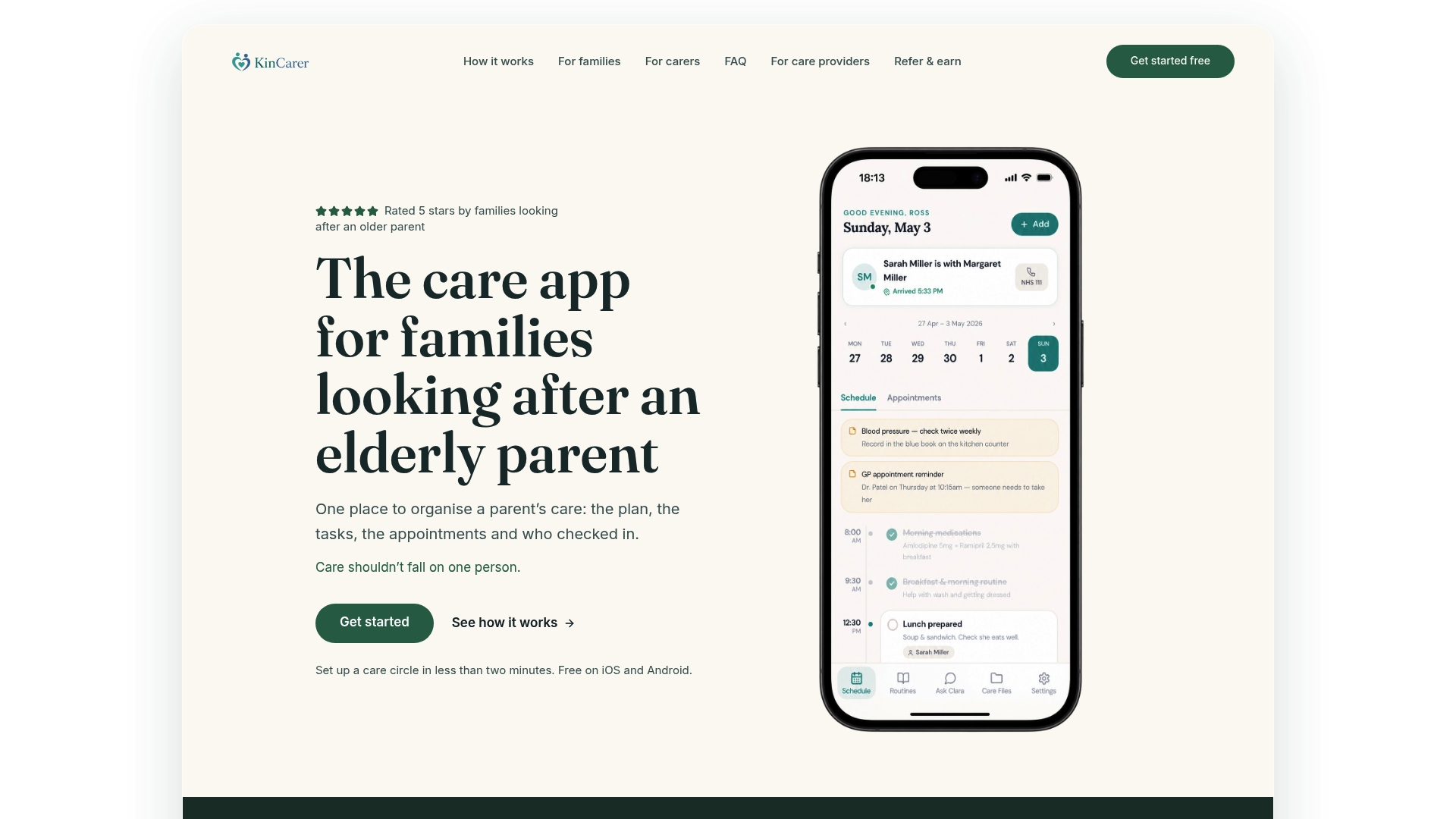
If your family is juggling a home care agency, a couple of siblings and an ageing parent who is not always keen on “the app thing,” start with the KinCarer family app and set up a care circle this evening rather than this weekend. Care organisations looking at family engagement more broadly can find details on the KinCarer organisations page. Either way, the next concrete step is the same: create a profile, invite one relative, and add your first medication reminder tonight.
Sources
This guide draws on the Joseph Rowntree Foundation-linked study on unpaid carers’ time burden, UK home care cost data for 2025, and Kings Fund research on unpaid carers. For statutory processes, see NHS guidance on care and support and Age UK’s practical advice for families.
- Unpaid carers spend up to 220 hours managing care-system bureaucracy, major study reveals
- Cost of home care in the UK 2025 and how to pay for it
- Kings Fund report highlights the needs of unpaid carers (insight summary)
FAQ
What is the best app to track an elderly parent?
The best choice is a shared family care planning app rather than a single-user tracker, since caring for an ageing parent almost always involves more than one person. KinCarer is built around this shared model, with task assignment, medication reminders and handover notes in one place.
What is the app for taking care of elderly parents called?
There is no single named category, but these are generally called family care planning apps or care coordination apps, distinct from clinical rota software used by care agencies. KinCarer falls into this family-focused category.
How do I keep track of my ageing parents without losing my mind?
Centralise everything in one shared record rather than a mix of WhatsApp messages, memory and paper notes. A care circle with recurring tasks and a weekly 10 to 15 minute family check-in catches most problems before they become emergencies.
What can I do if my ageing parents expect too much of me?
Make the invisible workload visible to other relatives by logging tasks and time in a shared app, since siblings often underestimate how much one person is carrying until they see it written down. Where expectations still feel unmanageable, Age UK’s guidance on helping a loved one covers local support and respite options worth exploring alongside any app.