
6 essential fields to build a carer rota for UK families
Use a ready-made template, checklist and step-by-step plan to set up a secure carer rota for UK families. Includes consent checks.
By The KinCarer team ·
A carer rota is a shared schedule showing who visits, which tasks need doing and when, and what each person needs to know before and after their turn. The fastest way to start one is simple: copy a basic weekly template into a shared calendar or document, then invite the core people involved, including any paid carers. Everything else, the checklist, the setup steps and the backup plan, follows from that first move.
TL;DR:
- A carer rota should clearly specify responsibilities, including exact tasks, durations, emergency contacts, and priority flags for medication and medical appointments.
- Building and agreeing on a rota requires honest mapping of availability, consistent handover formatting, and regular review routines involving all family and paid carers.
- Sharing health information with paid carers must adhere to explicit consent protocols, sharing only what’s necessary, and documenting agreements to protect privacy.
- An emergency plan should be integrated with the rota, listing contact details, medications, allergies, and backup carers with a clear order of contact for unavailability.
- For families managing multiple contributors and complex schedules, dedicated care apps like KinCarer streamline coordination by combining task management, appointment tracking, and shared notes.
Table of Contents
- A ready-to-use carer rota template and checklist
- Step-by-step: build and agree a rota with family and paid carers
- Including paid carers and professionals without breaching trust
- Emergency and contingency planning tied to the rota
- Choosing the right tool for your family’s rota
- Keeping the rota working week after week
- When siblings shared hospital visits, everyone coped better
- How KinCarer helps you run a carer rota
- Sources
- FAQ
A ready-to-use carer rota template and checklist
Before you fill anything in, decide what fields the rota needs. Most families find these six cover it:
- Date and time: when the visit or task happens.
- Who: the family member or paid carer responsible.
- Task: a precise action, not a vague category (for example, “give 8am medication” rather than “morning care”).
- Duration: roughly how long it takes, so no one underestimates a visit.
- Handover notes: what the next person needs to know.
- Emergency contact: who to call if something goes wrong during that slot.
Mark priority tasks clearly. Medication times and medical appointments carry more weight than general chores, so flag them differently, whether that’s bold text, a colour, or simply listing them first.
A sample week might look like this:
- Monday morning: eldest daughter does the shop and prepares meals for two days.
- Monday evening: son calls to check in and confirm medication was taken.
- Wednesday: paid carer visits for personal care; handover note left for the family.
- Friday: GP appointment, attended by whichever sibling is free that week.
- Weekend: rotates between family members, with one on standby as backup.
Pro Tip: Keep the template in one shared place from day one, even if it’s a basic spreadsheet. Moving systems later is far harder than starting simple.
Step-by-step: build and agree a rota with family and paid carers
Getting everyone on the same rota takes a bit of upfront conversation, but it saves arguments later.
- Map availability honestly: ask each person what they can realistically offer, not what they feel they should offer. A sibling an hour away might manage weekly calls but not daily visits.
- Choose your system: a shared calendar, a spreadsheet, or a dedicated app, depending on how many people are involved and how much detail you need to track.
- Set permission rules: decide who can edit the rota, who can only view it, and who approves changes.
- Split recurring and one-off tasks: medication reminders and weekly shops are recurring; a one-off hospital appointment needs its own entry with extra detail.
- Agree a standard handover format: even three lines, written the same way each time, prevents gaps.
- Set a review routine: a short weekly check keeps the rota current, and a monthly conversation catches bigger changes in needs or availability.
- Nominate a coordinator: one person who handles last-minute swaps so nobody is left guessing who’s covering a gap.
This structure matters because family contributions work best when they’re recognised formally, not just assumed. The Care Act’s whole-family approach recommends that local authority assessments record who provides care and how that fits into the overall support plan, which means your rota can genuinely feed into official planning, not sit separately from it.
- Keep the agreed rota visible to everyone, including any paid carers.
- Revisit the plan whenever someone’s circumstances change, not just on a fixed schedule.
Including paid carers and professionals without breaching trust
Bringing paid carers into the rota works well, but it needs clear boundaries around information sharing. Health and care professionals need explicit consent before sharing personal health details with an unpaid carer, according to NHS Digital’s guidance, so check whether consent has been given, or whether a Lasting Power of Attorney is in place, before assuming information can flow freely.
Share only what’s necessary for the task at hand. A paid carer doing personal care visits doesn’t need the full medical history, just the relevant instructions.
- Record any information-sharing agreements in writing, even briefly.
- Agree what paid carers log on the rota: tasks completed, observations, nothing more.
- Clarify who makes clinical decisions, which should never default to whoever happens to be present.
- Involve the GP, community nurses or a social worker when changes in condition go beyond what the rota can capture.
Pro Tip: If you’re unsure whether something can be shared, ask the professional directly rather than guessing. It’s a quick question that avoids a real problem later.
Emergency and contingency planning tied to the rota
A rota without a backup plan falls apart the moment someone’s unavailable. An emergency plan should sit alongside the rota, not separately from it, according to Oxford Health’s guidance for carers, which recommends keeping key medical and contact information together so anyone can step in safely.
Your emergency plan should include:
- Full contact details for every family member and paid carer involved.
- Current medications, doses and timings.
- GP surgery and pharmacy details.
- Allergies, mobility aids and any access notes for the home.
Mark backup carers directly on the rota, with a clear order of whom to call first if the scheduled person can’t make it. Store the plan somewhere everyone can reach quickly, a shared document, a printed copy by the phone, or within whichever system holds the rota itself.
Choosing the right tool for your family’s rota
A basic shared calendar works fine for a small, simple rota, two or three people covering straightforward visits. A spreadsheet suits families who want more detail, like tracking task history or rotating patterns. Once you’re coordinating several contributors, managing medication schedules, or juggling frequent appointments, a dedicated family care app tends to work better than either option.
This is where KinCarer fits. It’s built specifically for families coordinating care for an elderly parent or relative, not for care homes or paid staff rostering. It offers:
- Shared care circles where family members and invited paid carers see the same information.
- Task assignment, appointment tracking and medication reminders in one place.
- Handover notes so nothing gets lost between visits.
- Clara, an optional AI assistant that helps you search and summarise information in your care circle. Clara does not give medical, legal or clinical advice.
Pro Tip: When setting up a family care app, invite your core contacts first, set permissions before adding sensitive details, and create just two or three tasks to begin with. You can build out the rest once everyone’s comfortable with the system.
Keeping the rota working week after week

A rota only stays useful if handovers stay short and honest. A good handover note covers three things in one short paragraph: what happened, what’s next, and any risks to flag.
Set a rhythm: a quick weekly check to catch anything urgent, and a monthly conversation to review how the rota’s working overall.
- Ask for a carer’s assessment if you haven’t already. It’s a statutory right that can lead to respite or other support, and it recognises the care you’re already providing.
- Swap shifts when something comes up rather than struggling through.
- Break bigger tasks into smaller, shareable ones so no single person carries the heaviest load.
Pro Tip: If the rota feels like it’s slipping, that’s usually a sign someone’s overloaded, not that the system has failed.
When siblings shared hospital visits, everyone coped better
A group of three siblings once split hospital visits for their mother using exactly this kind of rota: one handled mornings, another evenings, the third covered weekends and medication queries. Splitting the load didn’t just ease the logistics, it visibly reduced the strain each of them felt. Shared rotas like this consistently show the same pattern: small coordination steps prevent one person from carrying everything alone. If you haven’t asked for a carer’s assessment yet, it’s worth doing so.
— KinCarer
How KinCarer helps you run a carer rota
Running a family carer rota by text message and memory gets harder as needs grow, and that’s exactly the gap KinCarer is built to close. It brings shared care circles, task assignment, appointment tracking, medication reminders and handover notes into a single space that both family members and any paid carers you invite can see.
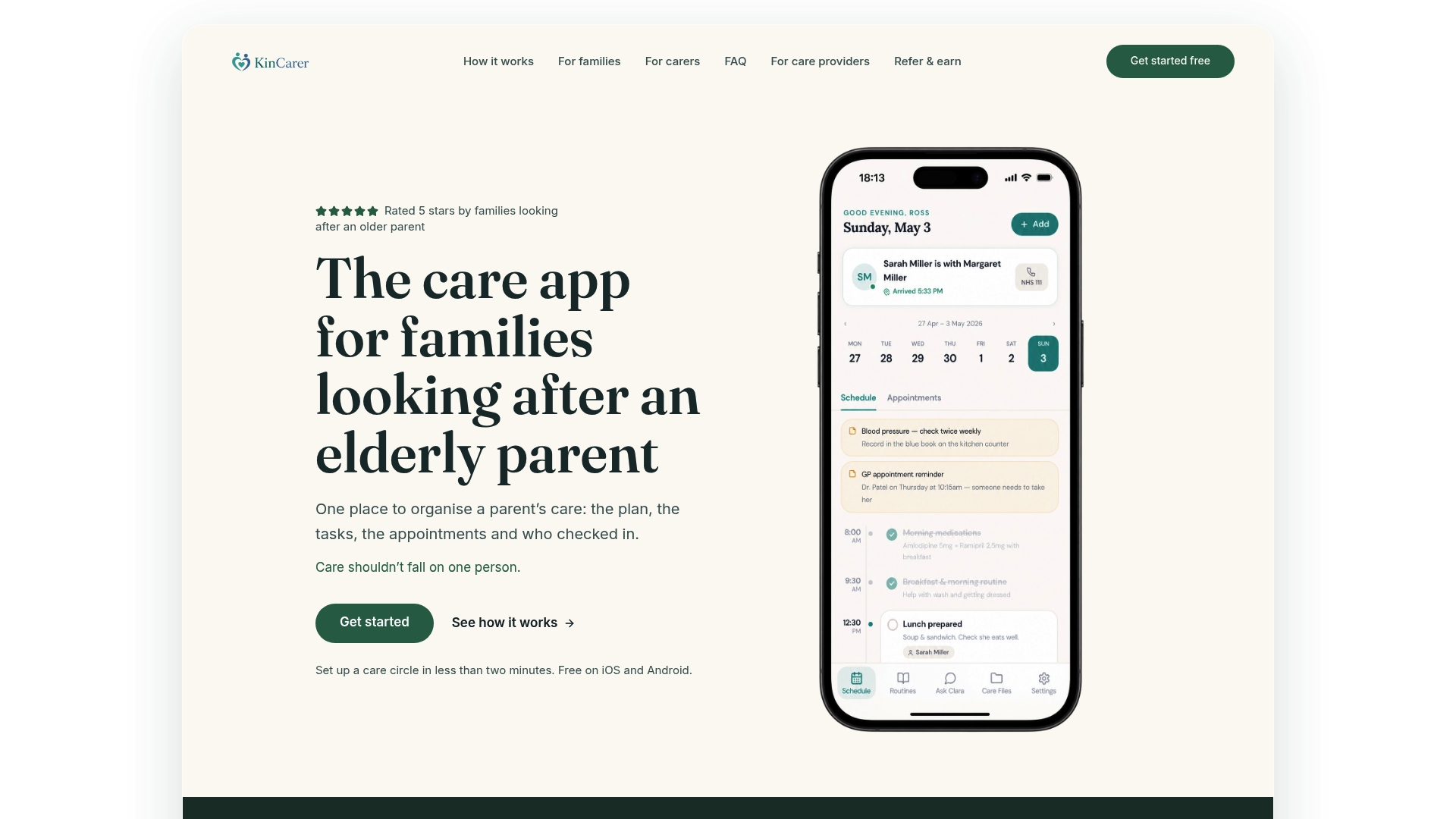
- A single subscription can cover multiple invited members of the care circle.
- Clara, the built-in AI assistant, helps you find and summarise information quickly, without offering clinical or legal advice.
- Setup takes minutes: invite your core contacts, set permissions, and add your first tasks.
If you’re coordinating unpaid and paid carers and want one place everyone trusts, start the 14-day free trial to see how it fits your situation.
Sources
For deeper guidance, Carers UK’s contingency planning advice covers building a backup plan, while Age UK offers practical advice on asking for help. The Care Act statutory guidance explains carer’s assessments, and organisations like ReVivo show how shared rotas support day-to-day home care coordination in practice.
- NHS Digital – sharing information with unpaid carers
- Local Government Association – Care Act and whole-family approaches
- Oxford Health – carers’ emergency plan guidance
FAQ
What should a carer rota include?
A carer rota should include the date and time, who’s responsible, a precise task, expected duration, handover notes and an emergency contact. Flagging priority items like medication and appointments separately from general chores helps prevent anything urgent from being missed.
Do I need consent to share my parent’s health information with carers?
Yes, health and care professionals need explicit consent before sharing personal health details with an unpaid carer, as NHS Digital explains. If a Lasting Power of Attorney is in place, that can also affect what information can be shared.
How do I ask for a carer’s assessment?
You can request a carer’s assessment through your local authority, and it’s a statutory right rather than an optional extra. It can identify support such as respite care or training that protects your own wellbeing while you care for someone else.
When should I move from a spreadsheet to a care app?
A spreadsheet or shared calendar works well for a small, simple rota with just a couple of contributors. Once you’re coordinating several family members, tracking medication schedules, or managing frequent appointments, a dedicated family care app like KinCarer tends to keep everyone better aligned.
What happens if the person scheduled on the rota can’t make it?
Mark backup carers directly on the rota with a clear order of whom to call first, so cover isn’t left to chance. Keeping an emergency plan alongside the rota, as Oxford Health recommends, means anyone can step in safely with the right information to hand.