Stop Sibling Friction: 5 Step Care Plan App Trial for UK Families
Use this UK family guide to test care plan apps: run the five step trial, follow the first week checklist, and ease sibling friction.
By The KinCarer team ·
For families juggling appointments, medication and daily check-ins for an elderly parent, a care plan app is a practical option to try first. It works because it gives every relative and paid carer one shared care circle, with tasks, medication reminders and clear handover notes in a single place. Adopt it properly and you should see fewer missed tasks and far less repetition in who-told-who-what.
TL;DR:
- Family care plan apps are most effective when tested thoroughly with real users, focusing on secure cloud storage, user-friendly setup, and permission controls.
- Key features include shared care circles, task and medication tracking, appointment management, document vaults, and notifications tailored to user confidence levels.
- Choosing the right app involves running a short trial, setting clear roles and preferences within the family, and testing tasks, documents, and platform stability before committing.
- Cloud-based access ensures information remains available during emergencies or connectivity issues, with encryption and permissions protecting sensitive health data.
- Support and training, including easy onboarding, responsive help channels, and device compatibility, are critical to sustained app adoption and effective care coordination.
Table of Contents
- What makes family care‑planning apps worth the switch?
- What features actually matter in a care plan app?
- How do you actually choose the right app for your family?
- Quick setup: a first-week checklist to make it stick
- Why secure, cloud-based access matters more than you’d think
- Will it work on everyone’s phone, tablet and laptop?
- What support and training can you actually expect?
- What does a care plan app cost, and is there a free trial?
- Can it connect with medical records or other health apps?
- What happens if you lose signal or wifi?
- Perspective: using the app to ease sibling friction
- Kincarer: how it matches the checklist, and how to start
- Sources
- FAQ
What makes family care‑planning apps worth the switch?
The case for moving off group chats and notebooks isn’t just convenience. Research into shared care plans for families managing complex needs found that digital, collaborative plans improve caregiver autonomy and give everyone the same up-to-date picture of what’s happening, particularly useful when something goes wrong unexpectedly. A related study on online collaborative care planning found that centralising information this way reduces the burden of relaying updates and gives families a genuine single source of truth during both routine weeks and emergencies.
A shared care circle cuts the repeat-calling problem almost immediately. Instead of your sister texting you, then you calling your brother, then someone forgetting to mention the GP appointment moved, everyone reads the same update once.
The practical gains families report tend to cluster around a few things:
- Less duplicated effort chasing the same information from different people
- Fewer buried updates lost in long WhatsApp threads
- A visible record of who did what, which reduces “I thought you were doing that” arguments
- Easier handovers when one carer is away and another steps in
None of this is frictionless. Trials of family-centred care apps have found that technical issues and a lack of customisation can limit sustained use, so go in expecting a short settling-in period rather than instant perfection. The families who stick with an app are usually the ones who test it properly before relying on it, which is exactly why a trial run matters more than reading reviews.
What features actually matter in a care plan app?
Not every feature on a product page changes your daily life. Some are essential; others are nice extras you’ll rarely open. A checklist helps you judge an app on what it does for your family, not on how long its feature list runs.
Must-have features:
- A shared care circle that relatives and paid carers can join, with control over who sees what
- Task assignment and completion tracking, so it’s obvious who’s doing what and by when
- Appointment and calendar management that syncs across everyone’s phone
- Medication reminders that don’t require checking three different sources
- Handover and visit notes that read like a proper update, not a fragment
- A document vault for GP letters, care assessments and other paperwork you’d otherwise hunt through email for
Usability features that decide whether people actually use it:
- Onboarding that takes minutes, not an evening
- Notifications that inform rather than nag, especially for less tech-confident relatives
- Permission controls so a distant cousin sees updates but can’t edit medication records
- An activity log so you can see what changed and when, without needing to ask
Research into cloud-based shared care plans backs this up directly: user-centred studies identified accessibility from multiple devices, collaborative editing, and secure caregiver-controlled permissions as the four requirements that actually determine whether families keep using a shared plan.
Pro Tip: Before you commit, ask whether the app lets you set different permission levels for family versus paid carers. A care provider often only needs to see today’s tasks and medication times, not your dad’s full financial documents.
How do you actually choose the right app for your family?
The best way to choose isn’t to compare spec sheets. It’s to run a short, structured trial with the people who’ll actually use it.
Before you download anything, get the basics agreed as a family. Who’s the lead coordinator? Does your mum want a gentle daily nudge or a weekly summary? Does your brother, who lives two hours away, want fewer notifications than the sibling doing daily visits? Settling this first avoids half the family switching off notifications in week one out of irritation.
- Create the account and add the essentials — your parent’s basic details, emergency contacts and current medications.
- Invite the core circle — the two or three people doing most of the hands-on organising first, before opening it wider.
- Assign a handful of sample tasks and one recurring reminder — something real, like the Tuesday pharmacy collection, not a test task nobody cares about.
- Test document sharing — upload one genuinely useful document, like a hospital discharge letter, and see how easily everyone can find it later.
- Watch for friction — logins that fail, sync delays, or confusing menus. Implementation reviews of care coordination apps consistently flag login problems and platform stability as the barriers that quietly kill adoption, so this is worth testing properly rather than assuming it’ll be fine.
Before you subscribe to anything, ask three questions: can you export your data if you ever leave, what happens to the care circle if one member wants to exit, and what support is available if someone gets stuck. A trial that can’t answer these clearly is telling you something.
Quick setup: a first-week checklist to make it stick
Getting an app adopted has less to do with features and more to do with sequencing. Rushing the whole family in on day one usually backfires.
- Days 1 to 2: Set up the profile properly. Add emergency contacts, upload key documents (GP details, care assessment, power of attorney paperwork if relevant) and list current medications accurately.
- Days 3 to 4: Invite two or three close relatives and one paid carer if your parent has one. Assign a couple of recurring tasks and set one medication reminder so people see the app doing something real, not sitting empty.
- Days 5 to 7: Agree a short weekly review, ten minutes is plenty, and settle on a simple handover template everyone uses the same way. Remove whatever’s causing friction, whether that’s too many notifications or a confusing task label.
Pro Tip: Don’t invite the whole extended family in one go. Start with the people doing daily hands-on care, get the habit bedded in, then widen the circle once the basics feel automatic rather than effortful.
Why secure, cloud-based access matters more than you’d think
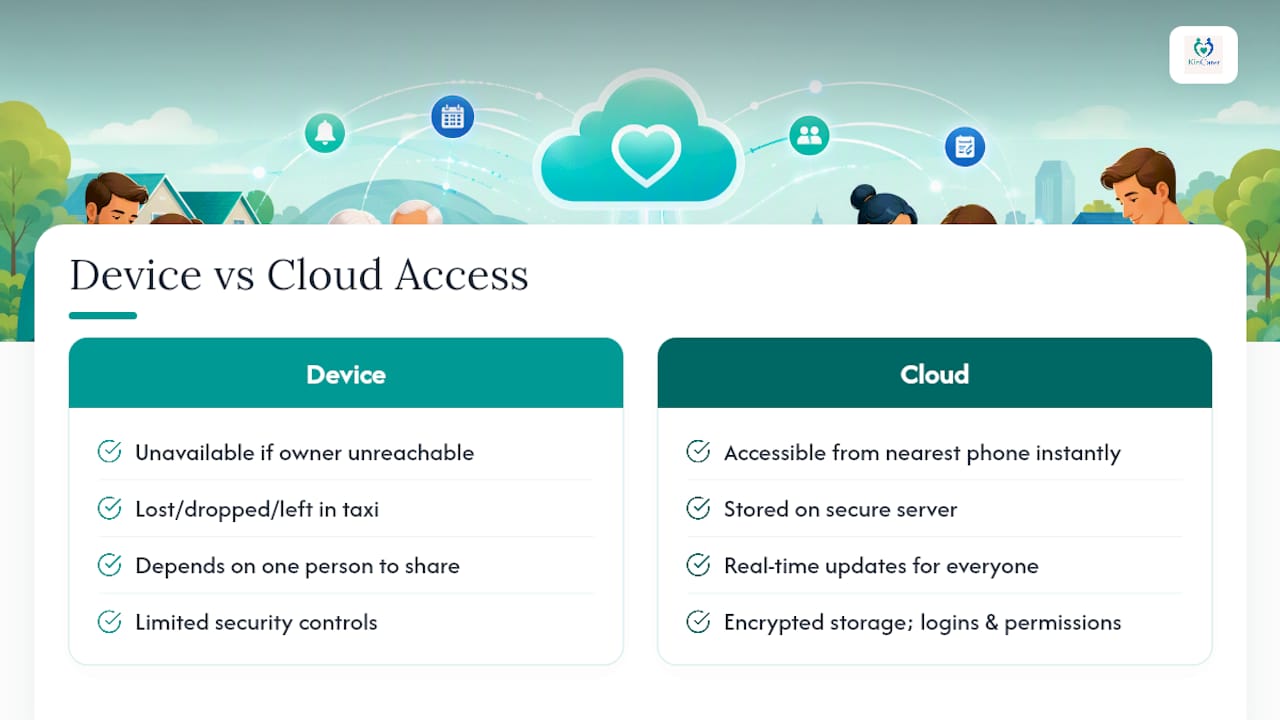
A care plan sitting in one person’s head, or one person’s phone, is a single point of failure. If that person is unreachable, ill, or simply asleep when something happens, everyone else is stuck. Cloud-based access solves this properly: the information lives on a secure server, not on a device that can be lost, dropped in the bath, or left in a taxi.
This matters most in the moments you can’t plan for. If your dad has a fall and an ambulance crew asks what medication he’s on, the person answering the door needs that information instantly, not a text to a sibling who’s on a plane. Cloud storage means the same up-to-date record is available from whoever’s phone is nearest, rather than depending on one device being present and charged.
Security has to work both ways here. You want fast access in an emergency, but you also want confidence that sensitive health information isn’t sitting somewhere insecure. The features that matter are encrypted storage, individual logins rather than one shared password, and permission settings you control yourself, so you decide exactly who sees medical details versus who just sees the shopping list task.
Cloud access also means updates happen in real time. When one sibling logs a GP call at 9am, the rest of the family sees it by 9:01, not whenever someone remembers to mention it at Sunday lunch.
Will it work on everyone’s phone, tablet and laptop?
Families are rarely running the same device. Your mum might have an old Android tablet, your brother’s got the latest iPhone, and you’re checking updates from a work laptop between meetings. A care plan app that only works well on one platform quietly excludes whoever’s using the “wrong” one.
The apps worth considering work across iOS and Android as genuine native apps, not a mobile website squeezed to fit, and offer a browser-based version for anyone who’d rather check updates on a computer. That matters for the relative who finds a small phone screen fiddly but is perfectly comfortable on a laptop.
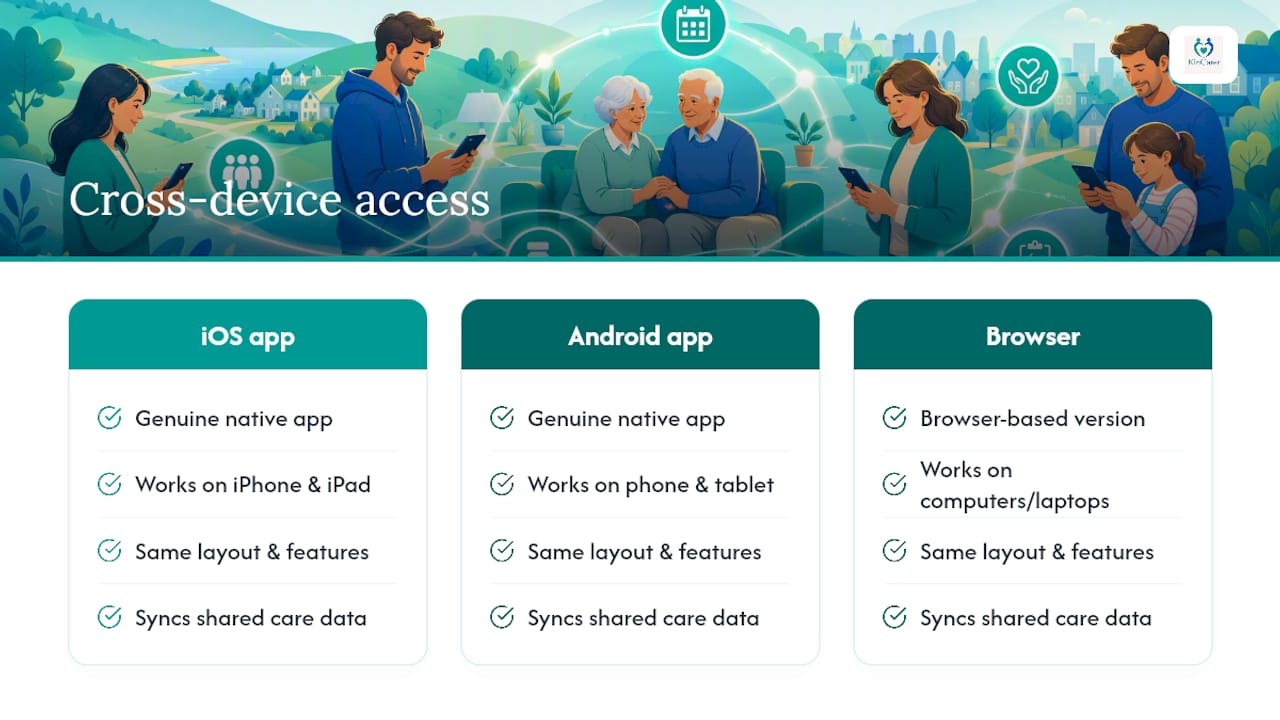
Cross-device compatibility also protects against the awkward moment when someone upgrades their phone and finds the app they’d got used to doesn’t feel the same, or doesn’t sync properly, on the new device. Look for apps that keep the same layout and features regardless of screen size or operating system, so muscle memory carries over.
If your parent has a smart home or wearable safety device, it’s also worth checking whether the care app sits comfortably alongside it. Not every family needs this layer, but for parents living alone, it can add a useful second line of visibility alongside the care circle itself.
What support and training can you actually expect?
Not every family member is equally comfortable downloading an app, let alone using one daily. Good support isn’t a nice extra here, it’s often the difference between an app that gets adopted and one that gets abandoned after week two.
Look for in-app guidance that walks a new member through their first login and first task, rather than dropping them into a blank screen. Written help centres matter, but so does having a genuinely responsive support channel, email or live chat, for the relative who’s stuck at 8pm trying to add mum’s blood pressure medication and getting frustrated.
Training doesn’t need to be formal. The apps that work well for families tend to explain themselves through short prompts and clear labelling rather than requiring anyone to read a manual. If you’re the one setting things up, it’s worth doing a five-minute walkthrough call with less tech-confident relatives rather than just sending an invite link and hoping. That single call often decides whether they engage properly or quietly stop opening the app.
What does a care plan app cost, and is there a free trial?
Cost is usually the first question, and it’s a fair one. Most family care‑planning apps use a freemium model: a free tier that covers the basics, and a paid subscription that unlocks the full shared care circle, unlimited members, or extra storage for documents.
The sensible approach is to treat the free trial as your actual decision-making tool, not a formality before you commit. Use it properly, invite the real people, add real tasks, test the real medication list, rather than a token version with placeholder data. That’s the only way you’ll know whether the paid tier is worth it for your family specifically.
Kincarer offers a 14-day free trial before moving to its paid Family+ subscription, giving you time to test the shared circle with actual relatives before deciding. Current pricing details are available on the Kincarer site rather than repeated here, since plans and tiers can change.
Whatever app you’re considering, check what happens if you stop paying. Do you lose access to historic notes and documents, or can you still view them on a free tier? That answer matters more than the monthly price itself.
Can it connect with medical records or other health apps?
It’s worth being clear about what a family care plan app is, and what it isn’t. Studies of cloud-based shared care plans caution that these apps work best as a supplement to clinical records, not a replacement for them. Your GP’s electronic health record stays the authoritative clinical source. What a family app gives you is the practical, day-to-day layer sitting on top: who’s doing the school run equivalent of care, what was said at the last appointment, which medications were actually taken.
Some apps allow document uploads, so a hospital discharge summary or care assessment can sit in the family’s shared vault even if it can’t sync directly with an NHS system. That’s often enough. Families rarely need real-time EHR integration; they need to stop losing paper letters and repeating themselves to every new carer who turns up.
If a paid home care agency is involved, ask whether they can be invited into the circle with limited permissions, seeing today’s tasks and medication times without access to financial or legal documents. That distinction, adjunct tool versus clinical system, is worth understanding before you assume an app will do more than it’s designed to.
What happens if you lose signal or wifi?
Care doesn’t pause because a mobile signal drops. If your parent lives somewhere with patchy reception, or you’re checking updates from a hospital waiting room where wifi is unreliable, an app that only works fully online is a liability at exactly the wrong moment.
The better care plan apps cache recent information locally, so you can still see today’s tasks, the medication list and recent notes even without a live connection. Once you’re back online, everything you added offline, a completed task, a new note, syncs automatically without you needing to do anything manually.
This matters more than it sounds. A carer jotting down “gave 2pm medication” while stood in a signal blackspot at a care home needs that note to save regardless of connection, and needs it to appear for everyone else the moment signal returns. Apps that fail this basic test tend to get abandoned fastest, because the one moment you really need the app to work is often the moment connectivity is worst.
Perspective: using the app to ease sibling friction
The technology matters less than what it’s used for. Set visibility, not surveillance, as your actual goal. An app that lets everyone see effort being made stops the “I’m doing everything” resentment before it starts, but turning it into a tool for checking up on each other breeds exactly the friction you’re trying to avoid.
Naming one person as day-to-day lead, with real authority to make small decisions, avoids the paralysis of needing everyone’s agreement on every task. The app keeps others informed without requiring their sign-off on each one. Schedule a short, task-free check-in occasionally too. A ten-minute call that isn’t about the rota keeps the relationship, not just the rota, intact.
— Kincarer
Kincarer: how it matches the checklist, and how to start
Everything covered above, the shared circle, task tracking, medication reminders, visit notes and secure permissions, maps directly onto what Kincarer is built to do. Families create one care circle, invite relatives and paid carers with the access level that suits each person, and keep tasks, appointments, medication reminders and handover notes in one place instead of scattered across texts and notebooks. Kincarer also includes Clara, an optional AI assistant that helps you search and summarise what’s already in your care circle. Clara doesn’t give medical, legal or clinical advice; it simply helps you find what’s already been recorded faster.
For your first week, the checklist above translates easily: create your circle, add your parent’s essentials, invite two or three close relatives, and set two recurring tasks plus one medication reminder before widening access further. If a home care agency is involved, Kincarer’s organisation-focused page covers how paid carers can be added with appropriate permissions. Start a free trial with your actual family circle this week, not a placeholder one, and you’ll know within days whether it fits how your family actually communicates.
Sources
The claims above draw on peer-reviewed and implementation research into shared care planning, including work on online collaborative care planning, cloud-based shared care plans for families managing complex care, end-user testing of a family care coordination app, and an AHRQ implementation evaluation identifying common technical barriers. Together they support the core finding: shared, permission-controlled care plans improve coordination, provided families test the practical mechanics before relying on them fully.
- Caregiver and care team perceptions of online collaborative care planning for CMC
- Outcomes of end‑user testing of a care coordination mobile app with families of children with special health care needs: simulation study
- Evaluation of a FHIR-enabled mobile application for care coordination (AHRQ report)
FAQ
What is the best care plan app for families?
Kincarer is designed specifically for unpaid family members coordinating an elderly parent’s care, offering shared care circles, task tracking, medication reminders and handover notes in one place.
Do care plan apps replace medical records?
No. Research on cloud-based shared care plans is clear that these apps work best as a supplement to clinical records, not a replacement, so your GP’s records remain the authoritative source.
Can paid carers and relatives use the same app?
Yes. Most family care‑planning apps, including Kincarer, allow you to invite both relatives and paid carers into one circle with different permission levels for each.
What if the app doesn’t work without internet?
Look for apps that cache recent tasks, notes and medication information locally and sync automatically once connection returns, since care needs don’t pause for a dropped signal.
Is there a free trial before paying for a care plan app?
Kincarer offers a 14-day free trial before moving to a paid Family+ subscription, giving you time to test the shared circle with real family members before committing.