Stop Missed Doses: Best Medication List Apps for UK Family Carers
Practical steps for UK family carers to set up a shared medication list, stop missed doses, assign an owner, and use dose confirmations.
By The KinCarer team ·
The best medication list apps for families are shared care-circle apps, not solo pill trackers. If you’re coordinating your mum’s tablets with a sibling or a home care agency, you need one current list, shared reminders and handover notes everyone can see. This kind of app is built for exactly this. Nothing here replaces your GP or pharmacist.
TL;DR:
- A true family medication app should include comprehensive details such as medication name, dose, frequency, prescriber, pharmacy, reason, and special instructions to prevent confusion.
- The app must feature shared reminders with dose confirmation and low-supply alerts to ensure medication adherence and avoid missed doses or stockouts.
- Proper setup involves collecting source documents, building a detailed master record, assigning roles, and running a trial to adjust notification settings for effectiveness.
- Apps are only organizers, so families must always copy labels exactly and update immediately after appointments while controlling access securely.
- Using a shared activity feed, role assignments, and an AI summarizer can significantly reduce family inquiries and improve coordination.
Table of Contents
- What must a family medication list app actually do?
- How do you set up a shared medication list in one sitting?
- What can medication apps never replace?
- How do you stop missed doses and notification overload?
- How families actually organise a shared care circle
- Where Kincarer fits into this picture
- Sources
- FAQ
What must a family medication list app actually do?
A medication list scattered across three phones and a kitchen noticeboard isn’t a system. It’s a rumour. The families who avoid missed doses and duplicate doses use one master record that every carer can see and trust, updated by the right person at the right time.
Before you download anything, check the app against this list.
The master medication list must capture:
- Medication name and exact dose
- Frequency and time of day
- Prescribing clinician’s name
- Pharmacy details
- Reason the medication was prescribed
- Any special instructions (with food, avoid alcohol, morning only)
That level of detail matters because a master medication list should include name, dose, frequency, time, prescriber, pharmacy, reason and special instructions, and missing any one field is usually where confusion starts, especially when a new carer joins mid way through a treatment change.
Beyond the list itself, look for:
- Shared reminders with dose confirmation, not just an alert that fires and gets ignored
- Low-supply or refill warnings so nobody discovers an empty box on a Sunday evening
- Inviteable roles for siblings, other relatives and paid carers, with clear edit ownership
- An activity feed or handover notes so updates don’t rely on someone remembering to text the group chat
- Platform availability across iOS, Android and web, since families rarely share one device type
- Basic privacy controls so only people you’ve actually invited can see medical information
Watch for red flags too: apps that let anyone edit without an audit trail, apps that send a panic-style alert for every minor change, and any setup that leaves two people keeping “their own” list. Two lists always drift apart eventually.
Pro Tip: If an app can’t show you who changed what and when, treat that as a dealbreaker, not a minor inconvenience. That audit trail is what stops a well-meaning update from becoming a dosing mistake.
How do you set up a shared medication list in one sitting?
Setting this up properly takes less time than most families expect, particularly if you gather your paperwork first.
- Collect the source documents. Pull together prescription labels, the most recent GP letter, and pharmacy printouts. These are your ground truth, not memory.
- Build the master record. Enter each medication with its full details, dose, frequency, prescriber, pharmacy, reason and any special instructions, copying wording straight from the label rather than paraphrasing.
- Invite the people who need to see it. Add siblings, your mum’s home care agency staff if relevant, and anyone else in the care circle. Assign roles so it’s clear who can edit versus who can only view.
- Turn on dose confirmations and low-supply alerts. A confirmation tells you a tablet was actually taken, not just that a phone buzzed. Add a short handover-note template too, so updates after appointments follow the same format every time.
- Run a trial for a few days. Watch how the notifications land. Some family members will want every alert; others will want a daily digest. Adjust settings and confirm, out loud if you have to, who owns future updates.
A shared digital care plan like this gives every authorised family member access to current medication information, reminders and notes, which is what actually reduces reliance on scattered texts or photographed paper lists that go stale the moment someone changes a dose.
Pro Tip: Don’t skip the trial period. Most notification problems, too many alerts, wrong person getting pinged, missing permissions, only show up once the system is actually running for a few days.
What can medication apps never replace?
An app organises information. It doesn’t make clinical decisions, and treating it as though it can is where families run into trouble.
Keep these boundaries firm:
- Copy the label, don’t interpret it. Type the dose and instructions exactly as the pharmacist printed them, including start and stop dates for short courses like antibiotics.
- Flag anything that looks duplicated or contradictory and take it to the pharmacist rather than guessing which instruction is current.
- Update immediately after any appointment or hospital discharge. Record where the change came from (GP, consultant, discharge letter) and verify with the prescriber if anything is unclear.
- Control access properly. Invite only people who genuinely need to see medical information, and favour apps that are explicit about their security practices rather than vague about them.
None of this is complicated, but it’s easy to get sloppy about once a routine sets in. The habit of verbatim copying and immediate updates is what keeps a shared list trustworthy months, not just weeks, after you set it up.
How do you stop missed doses and notification overload?
The families who run this well tend to make the same handful of adjustments, usually after learning the hard way that a plain reminder isn’t enough.
- Choose dose confirmation over a bare reminder. A confirmation tells the family circle a tablet was actually taken, not just that an alert appeared on someone’s lock screen. Dose confirmations and low-stock alerts are consistently the features families find most useful, because they cut down the constant “did mum take her tablets” phone calls.
- Name one update owner and one backup checker. This is the single biggest fix for contradictory edits when several relatives are involved.
- Use a short, consistent handover template. Who made the change, when, why, and what to watch for. Four fields, every time.
- Let some family members choose a daily digest instead of instant alerts. Not everyone needs to feel their phone buzz every time a tablet is logged.
Pro Tip: Assign the update owner role explicitly, out loud, in a family conversation. “I assumed you were doing it” is how medication lists fall out of sync.
How families actually organise a shared care circle
Every family sets this up a little differently, and the shape usually depends on who’s closest and who’s most comfortable with a phone. Some households have one organiser, often the adult child who lives nearest, who manages the whole list while others simply check in. Others split it properly between siblings, one handling GP liaison, another managing day-to-day reminders. Where a home care agency is involved, paid carers often need view access to reminders and handover notes without full editing rights over the master record.
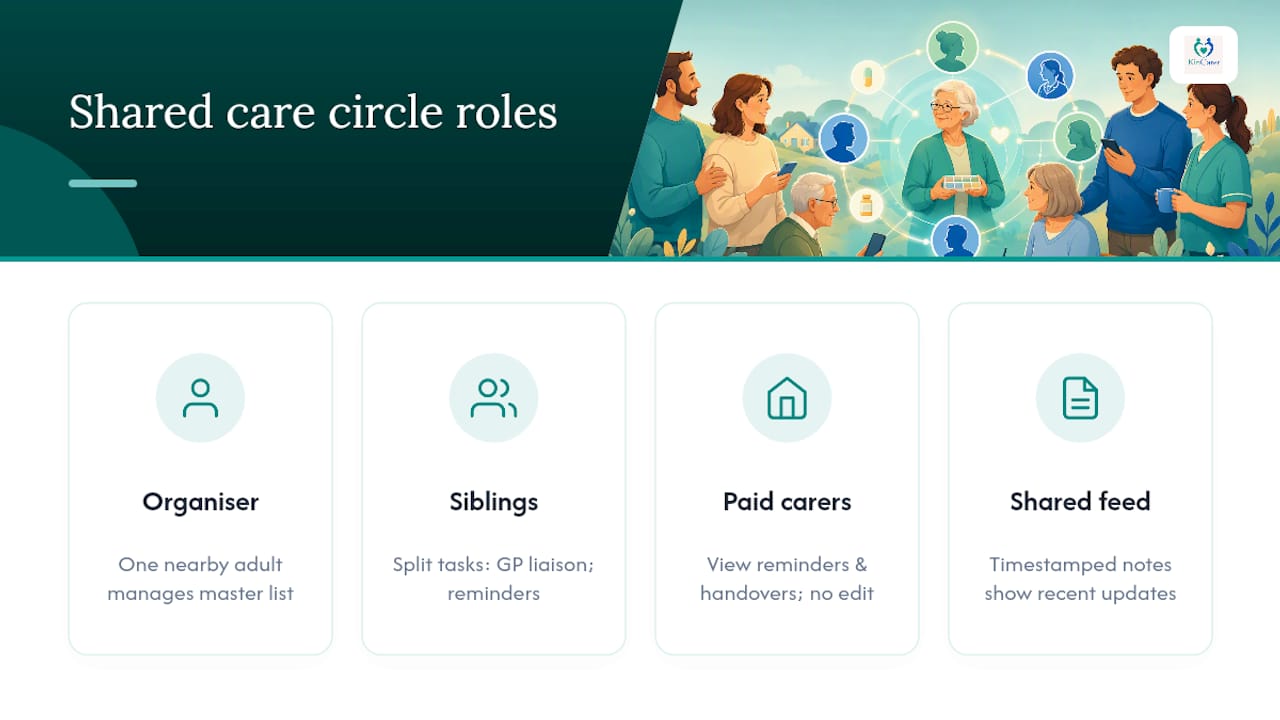
What consistently reduces friction is a shared activity feed. Instead of five people asking “has anyone heard from the doctor,” the answer sits in the app, timestamped, with a note attached. Families who add an AI assistant into that mix, one that can summarise recent changes into a short catch-up, tend to field far fewer repeated questions, since summaries can reduce repeated family questions by surfacing recent changes as a short handover rather than making everyone scroll back through weeks of messages.
If you’re starting today, do two things: pick one person to invite into the circle right now, and agree who the update owner is before you add a single tablet.
— Kincarer
Where Kincarer fits into this picture
The master medication list, shared medication reminders, invited carers and handover notes all exist inside Kincarer as a single family care circle. You add your mum’s medications with full detail, invite a sibling or a home care agency contact, and everyone works from the same current record instead of five conflicting screenshots.
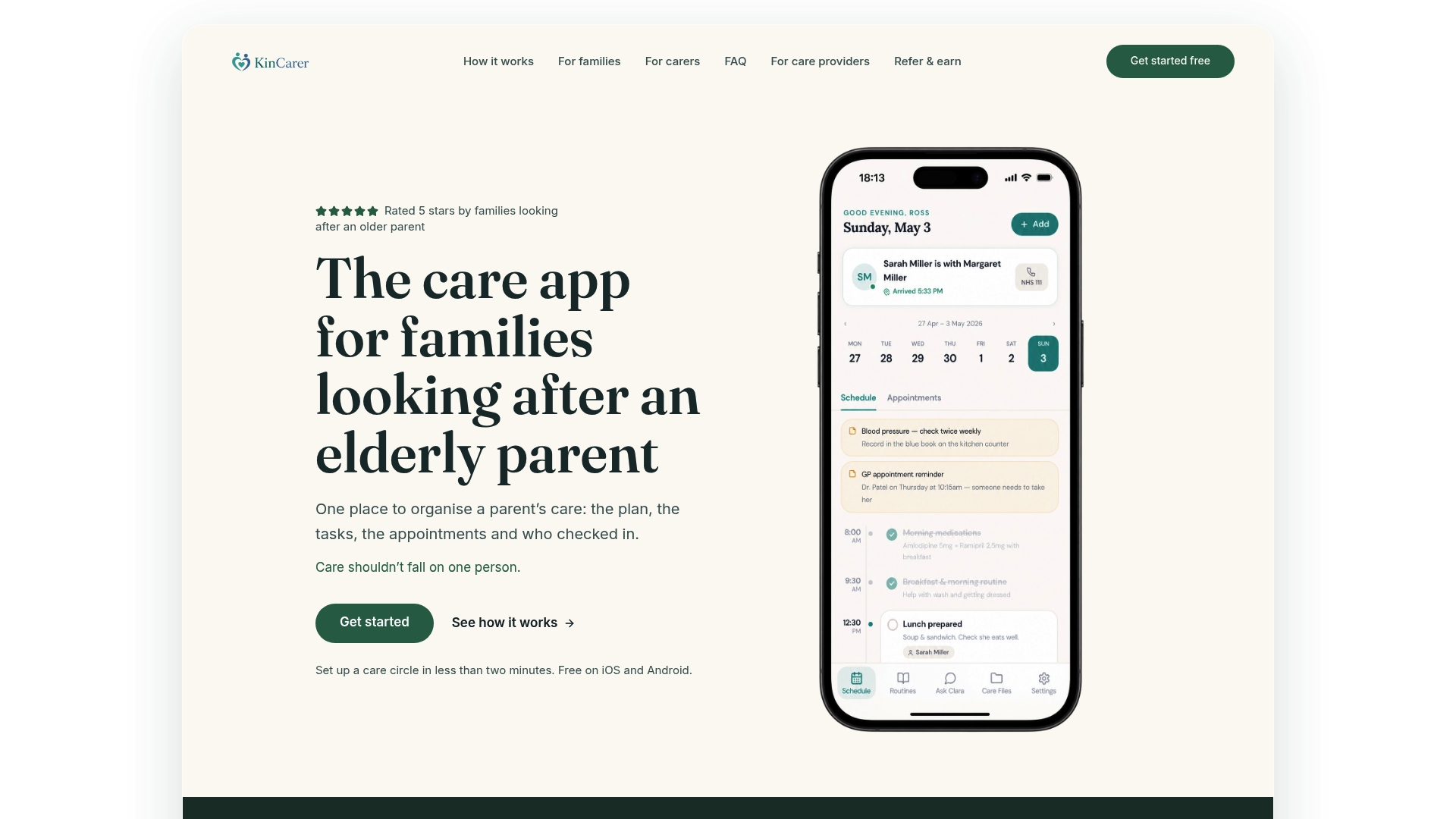
Kincarer also includes Clara, an optional AI assistant that can search and summarise what’s happening in your care circle, so a family member catching up after a busy week gets a short recap instead of scrolling through days of updates. Clara doesn’t give medical, legal or clinical advice; it simply helps you find and understand what’s already in your circle.
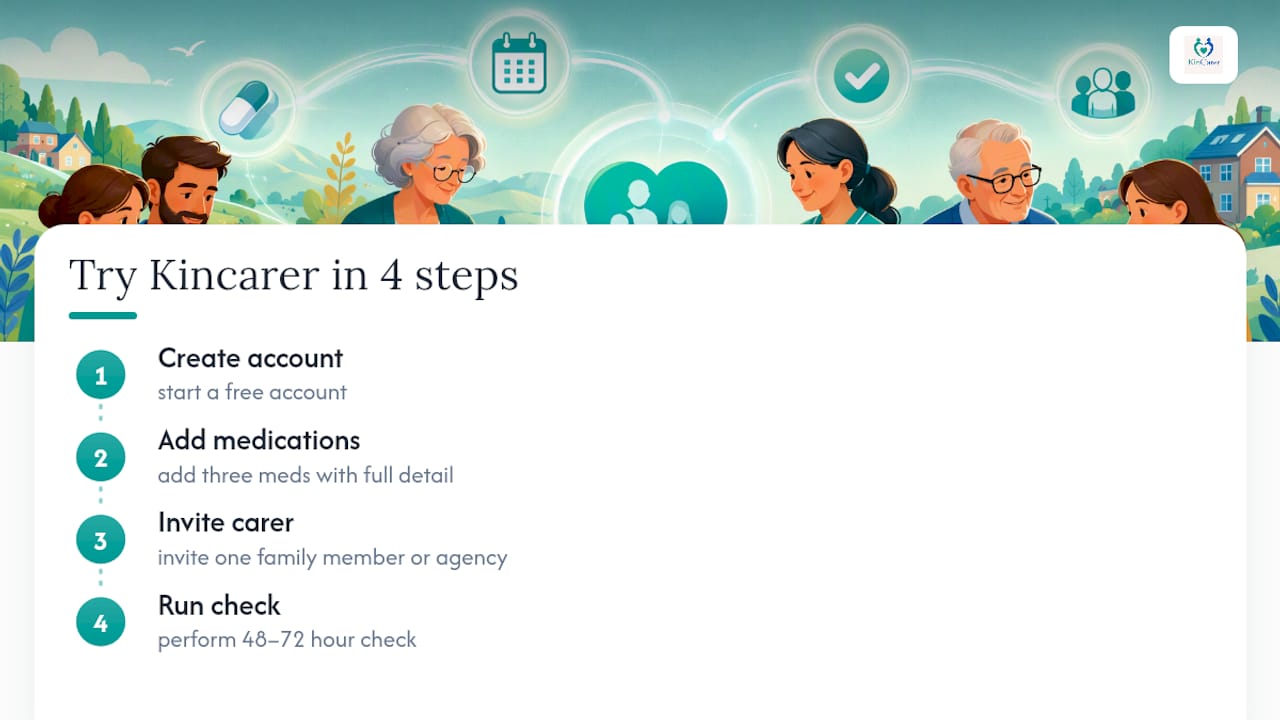
If your family is coordinating care through an agency rather than informally, the Kincarer organisations page explains how formal onboarding works. For everyone else, the practical next step is small: start the 14-day free trial, add three medications with full detail, invite one carer, and run the 48 to 72 hour check described above. That’s enough to see whether the notifications, roles and handover format actually suit your family before you commit to anything further.
Sources
For background on splitting medication duties between siblings without duplicating work, see this guide on coordinating a parent’s medications between siblings. If a paid carer is involved, this piece on medication reminders delivered by in-home carers covers how that role typically works alongside family oversight.
- Sharing the Job: How Siblings Can Coordinate One Parent’s Medications Without Stepping on Each Other | Useful Vitamins
- Medication Management for Elderly Parents | Maarge
- The Family App — BirdieBox
FAQ
What should a family medication list always include?
Medication name, dose, frequency, time of day, prescribing clinician, pharmacy, reason for the medication, and any special instructions. Missing fields are usually where confusion starts once more than one person is involved.
Who should be allowed to update the medication list?
Assign one update owner and one backup checker rather than leaving edits open to everyone. This single step prevents most of the contradictory changes families run into.
Can a medication app replace advice from a pharmacist or GP?
No. A shared app organises information and reminders; it doesn’t make clinical decisions, so flag anything unclear to a pharmacist or prescriber directly.
How do you stop reminder alerts from becoming overwhelming?
Offer a daily digest option for some family members instead of instant alerts for every dose, and lean on dose confirmations rather than repeated pings.
Does Kincarer work if a home care agency is also involved?
Yes. Paid carers and agency staff can be invited into the same care circle alongside family members, and Kincarer’s organisations page covers formal onboarding for agencies.