
Care Documents: One Emergency Folder and NHS Consent for UK Families
Keep care documents in a shared care app: pin one emergency folder, use clear naming and permissions, and follow an NHS/ICO consent checklist.
By The KinCarer team ·
Use a dedicated shared-care app to store and share essential care documents, and start with a pinned emergency folder plus a consent note. This keeps medication lists, appointment letters and legal paperwork out of email threads and WhatsApp chains where things get lost. Add simple naming and permission rules from day one, so every relative knows exactly where to look and who can see what.
TL;DR:
- Using a shared-care app ensures family members access the most current care documents while controlling permissions and sensitive information.
- Store essential documents like medication lists, emergency contacts, care plans, and legal papers in designated folders, while keeping sensitive items restricted.
- Regularly review and archive outdated files, and set monthly reminders to verify emergency and medication information remains accurate.
- Obtain explicit consent from the care recipient or verify LPA arrangements before sharing sensitive information, and update permissions as needed.
- Establish simple naming conventions and tagging systems to keep files organized, easily searchable, and prevent confusion between multiple versions.
Table of Contents
- What to store: essential documents for family care coordination
- How to store files safely inside a shared-care app: controls and daily habits
- Consent, capacity and legal permissions: what to check before you share
- Organising, naming and versioning: simple conventions so files are findable
- Emergency handover and appointment checklist to pin in the app
- A carer’s perspective: why setting a small routine beats chaos
- How KinCarer supports storing and sharing care documents
- Official guidance on consent, proxy access and data sharing
- Sources
- FAQ
What to store: essential documents for family care coordination
When you’re caring for an elderly parent, the hardest part often isn’t finding information, it’s knowing which version is current and who has seen it. Start by gathering the documents that matter most and keeping them somewhere everyone in the family can find them.
A practical starting list looks like this:
- Emergency contact list, including GP surgery and out-of-hours numbers
- An up-to-date medication list with doses and timings
- A recent GP summary or hospital discharge letter
- Care plan and personal preferences, including allergies
- Lasting Power of Attorney (LPA) paperwork, if one exists
- Copies of ID or passport, where needed for appointments or travel
- Insurance and financial contact details for handling bills
- Appointment letters and referral confirmations
Not everything belongs in general circulation. Financial documents and full clinical notes should stay limited to the one or two people managing them, while appointment dates and contact numbers are generally safe for the whole family to see.
It’s worth keeping a clear line between your own family notes and your mum’s official NHS record. NHS England describes shared care records as a secure way of joining records from different health and care organisations, with controls so only authorised professionals access them for direct care. That’s a different system from the folder you keep for the family, and when clinical access is genuinely needed, ask about proxy access rather than trying to recreate the record yourself.
How to store files safely inside a shared-care app: controls and daily habits
Email threads and unencrypted messaging apps weren’t built for sensitive family information. A shared-care app gives you access control, a record of who changed what and when, and one place everyone checks instead of five.
A simple folder structure keeps things from sprawling:
- Emergency, for the one-page summary everyone needs in a crisis
- Medications, for the current list and any changes
- Appointments, for letters, referrals and outcomes
- Legal and financial, for LPA documents and account details
- Notes and handovers, for day-to-day updates between carers
Permissions matter as much as the folders themselves. Invite only the people who genuinely need access, use view or edit roles rather than giving everyone full control, and keep the legal and financial folder visible to a smaller group. When a sibling steps back from active caring, revoke their access rather than leaving old permissions in place.
Old files pile up quickly, so build in a habit of archiving anything superseded and reviewing consent every few months rather than letting it go stale.
Pro Tip: Set a recurring monthly reminder to check the Emergency folder is still accurate, particularly after any medication or appointment change.

Consent, capacity and legal permissions: what to check before you share
Before you share anything sensitive about an elderly parent, it’s worth pausing on consent. NHS guidance on sharing information with unpaid carers says carers should establish with the person being cared for exactly what they’re comfortable sharing and with whom, and that this preference can change over time.
Where your parent lacks the capacity to agree, check whether an LPA is in place, or make decisions in their best interests and record why you made them. Gov explains that consent for sharing information should be sought and recorded, and that it can be amended or withdrawn as circumstances change.
A few practical habits keep this manageable:
- Add a short written consent note in the app stating what your parent has agreed to share
- Upload proof of LPA if one exists, and flag who holds it
- Note clearly who can change or withdraw permissions, and when that was last reviewed
One caution worth remembering: the same NHS guidance notes that information carers give to clinicians may end up recorded in the patient’s file and visible to them later, so think before adding sensitive observations that weren’t discussed with your parent first.
Organising, naming and versioning: simple conventions so files are findable
Confusion usually comes from having three versions of the same medication list floating around. A simple naming convention fixes most of it: date, short descriptor, then the person who uploaded it, for example “2026-06-10, meds-current, jane”.
A light tagging system speeds up searching further:
- Use tags like #meds, #LPA and #emergency so anyone can filter quickly
- Keep one “source of truth” medication file and update it in place, rather than uploading a new version each time
- Add a short edit log at the bottom of that file noting what changed and when
If your app includes a search or summary assistant, use it to pull up the latest version quickly rather than scrolling through old uploads. It’s worth remembering these tools help you find and understand what’s already there, they don’t give clinical or legal advice.
Pro Tip: Rename outdated files with “archived” once replaced, rather than deleting them, so there’s still a record if a question comes up later.
Emergency handover and appointment checklist to pin in the app
A single pinned page can save real time when something happens suddenly. Keep it short enough that anyone in the family, or a paramedic, could read it in under a minute.
- Emergency contacts and next of kin
- Current medications with doses and timings
- GP and pharmacy details
- Known allergies
- LPA status and who holds it
- A brief note on any recent changes in health or medication
- Upcoming appointments and recent hospital letters
Assign one lead carer to keep this page current, with a quick review scheduled monthly or whenever medication or appointments change. A short handover note template helps too: who is writing it, when, what has changed, and anything that needs immediate action.
A carer’s perspective: why setting a small routine beats chaos
The families who cope best aren’t the ones with the most elaborate system, they’re the ones with a small routine everyone actually follows. One pinned emergency folder and one person responsible for keeping it current does more than any amount of extra effort.
Start there. Review consent every so often, and when something changes, tell the rest of the circle rather than assuming they’ll notice.
— KinCarer
How KinCarer supports storing and sharing care documents
Some shared-care apps bring the habits above into one place. Families can set up a shared care circle with folders for documents, permission controls for who sees what, a pinned emergency note, and task and appointment tracking that stays visible to everyone invited.
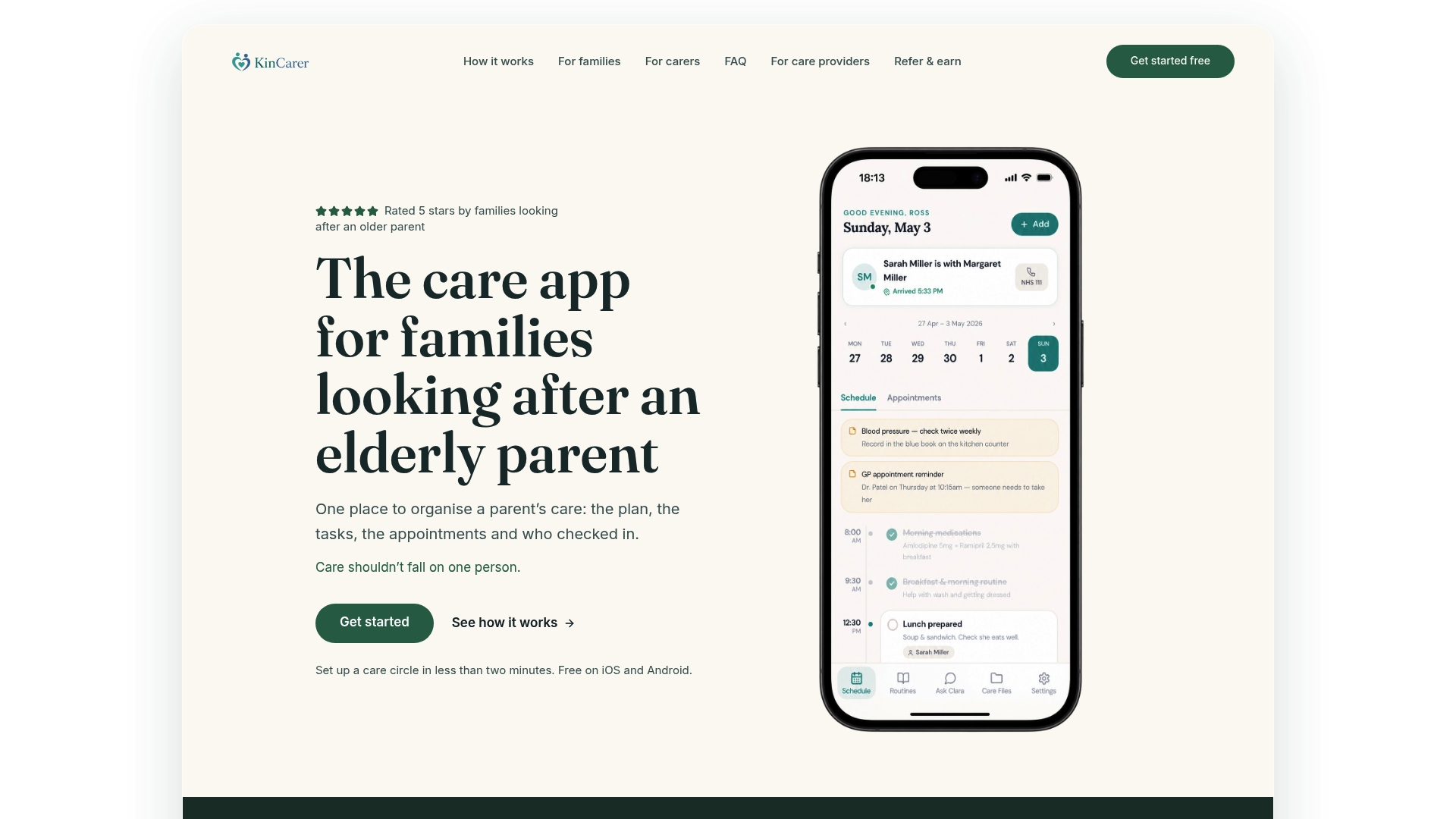
Inside the circle, some apps offer an optional assistant that helps you search and summarise what’s already stored, without offering clinical or legal advice of its own.
- Shared care circles for relatives and carers
- Folders and pinned notes for emergency information
- Permission controls to limit who sees sensitive documents
- Task, medication and appointment tracking in one feed
If you’re organising care for your own family, visit KinCarer for families to see how the circle works, or check the organisation-level options if you’re setting this up for a wider care group.
Official guidance on consent, proxy access and data sharing
For readers who want the underlying rules rather than just the practical steps, these are the primary sources worth reading directly.
- NHS guidance on sharing information with unpaid carers, covering consent and what carers should discuss before sharing
- Gov for information sharing during NHS continuing healthcare assessments
- ICO guidance on data sharing agreements, covering lawful basis, consent and retention
- Practical templates for agreeing family responsibilities are available through Noise’s articles on family coordination
Sources
- Sharing information with unpaid carers - NHS England Digital
- Gov
- Data sharing agreements - ICO
- Shared care records - NHS England
FAQ
What documents should I store for an elderly parent’s care?
Keep an emergency contact list, an up-to-date medication list with doses, a recent GP summary or discharge letter, allergy information, LPA paperwork and appointment letters. Separate sensitive items like financial and full clinical records from information that’s safe to share more widely, such as appointment dates.
Is it safe to share care documents by email or WhatsApp?
Unencrypted email and messaging apps don’t offer the access control or audit trail that sensitive family information needs. NHS guidance on secure email recommends secure channels, and a dedicated shared-care app achieves this more reliably for day-to-day family coordination.
Do I need consent before sharing my parent’s information?
Yes, wherever possible. NHS guidance says carers should establish what the person being cared for is comfortable sharing and with whom, and that this can be recorded and changed over time.
What if my parent can’t give consent themselves?
Check whether a Lasting Power of Attorney is in place, or make decisions in their best interests and record your reasoning. Gov.uk guidance on consent explains how consent should be sought and documented during NHS continuing healthcare processes, and this principle applies to family sharing too.
Can KinCarer replace my parent’s official NHS record?
No, KinCarer is a family coordination tool, not an official clinical record. It stores and shares the documents and updates your family needs day to day, while official shared care records remain managed separately by NHS and care professionals.