
UK families: KinCarer and NHS aligned medication reminder apps
Practical UK guide for families: set up NHS aligned medication reminder apps, create a shared care workflow, reduce missed doses and start with KinCarer.
By The KinCarer team ·
The most effective medication reminder apps for families are not single-user pill trackers. They are shared care apps, like KinCarer, that put the whole family and any paid carers into one care circle, so reminders, handover notes and medication changes stay visible to everyone involved. Families who switch to this kind of shared system tend to see fewer missed doses, clearer handovers between carers, and far less confusion about who did what.
TL;DR:
- Shared care apps like KinCarer enable role-based access for multiple family members and carers, reducing missed doses and improving coordination.
- Building a master medication list with photos, doses, and timing ensures clarity and helps prevent errors during routine reviews and care transitions.
- Compatibility with different devices, acknowledgement-based reminders, and accessibility features are essential for effective medication management for elderly and visually impaired users.
- App security should include PIN or biometric locks, proper permission controls, and offline backup options to protect sensitive health data.
- Regular reviews with healthcare professionals remain crucial, as apps support but do not replace clinical oversight, pharmacy systems, or medical advice.
Table of Contents
- Feature checklist: what family-focused medication reminder apps must offer
- How to set up a shared medication workflow that reduces risk
- How shared apps should work with GP, NHS services and pharmacy
- Data protection and privacy: practical steps for handling health data
- Why KinCarer fits the family use case for shared medication management
- Comparison of top medication reminder apps by features and user ratings
- Key criteria for choosing the best medication reminder app
- Tips for setting up and customising medication schedules effectively
- Accessibility features for elderly or visually impaired users
- Offline functionality and backup options for medication data
- Common challenges and troubleshooting tips for medication reminder apps
- Practical perspective: common mistakes carers make and how to avoid them
- Get started with KinCarer
- FAQ
- Sources
Feature checklist: what family-focused medication reminder apps must offer
A single-user pill tracker works fine for someone managing their own prescriptions. It falls apart the moment two or three people are involved in your mum’s care, because nobody else can see what has actually been taken, changed or missed. When you are choosing an app for a shared caregiving situation, look past the basic reminder function and check for the features that make coordination possible.
- Shared care circles with role-based access, so you can invite siblings, other relatives and a paid carer into the same space without giving everyone identical permissions.
- Full medication records, including the name, strength, dose and a photo of the packaging, not just a generic alarm label.
- Acknowledgement and missed-dose flags, so the family knows immediately if a dose was skipped rather than discovering it days later.
- Handover notes and a visible history, so the next person on duty can see what happened on the last shift without a phone call.
- Attachments for prescriptions, GP letters and appointment notes, kept alongside the medication they relate to.
- Straightforward onboarding, because the app is only useful if a less technical relative or a part-time carer can actually use it.
- Security controls, such as a PIN or biometric lock, so sensitive health information is not left open on a shared device.
Any app that ticks most of these boxes is built for the job families actually need done. One built around a single user’s pillbox is not, no matter how polished its reminder screen looks.
How to set up a shared medication workflow that reduces risk
Getting the app right is only half the job. The workflow around it matters just as much, and Carers UK’s guidance on managing medication points to a simple sequence that keeps everyone on the same page.
- Build a master medication list with a photo of each box or blister pack, the exact dose and the times it is taken.
- Confirm the list with the GP or pharmacist before you rely on it, particularly if your parent takes several medicines together.
- Book a structured medication review if your parent takes four or more repeat medicines. NHS England’s structured medication review guidance recommends these reviews every 6 to 15 months for people on multiple repeat prescriptions, as a chance for a pharmacist to check everything still makes sense.
- Invite relatives and paid carers into the app, and set their access so they see what they need and nothing more.
- Agree a handover routine, for example a short note logged every time someone administers medicine or visits.
- Switch on acknowledgements and run a trial period, checking for a week or two that reminders are actually being confirmed, not just dismissed.
- Add a pharmacy dosette box or monitored dosage system if your pharmacist recommends one, and keep logging in the app regardless.
Pro Tip: Set the trial period before a routine appointment, so any gaps in the new workflow come up naturally in conversation with the GP or pharmacist, not in a crisis.
This sequence gives you one documented source of truth instead of a patchwork of phone calls and sticky notes, which is exactly what the Specialist Pharmacy Service means when it says electronic reminders work best as part of a wider system rather than standing alone.
How shared apps should work with GP, NHS services and pharmacy
An app is a coordination tool, not a replacement for clinical oversight. The strongest setups treat the app as the place where the family keeps its own records straight, while GPs and pharmacists remain the source of clinical decisions.
- GP online services and the NHS App can give a carer proxy access to a parent’s record, letting them view medication lists and order repeat prescriptions directly.
- Bring your app’s medication list to every GP and pharmacy visit, so the version everyone is working from matches what is actually prescribed.
- Pharmacy dosette boxes and monitored dosage systems can help with daily organisation, but local NHS guidance on monitored dose systems notes they are not suitable for every medicine, and a prescription change needs to reach the family quickly to avoid double dosing.
- Before a hospital appointment, print or share the app’s medication record rather than relying on memory, which matches the approach Carers UK recommends for appointments.
None of this replaces a conversation with a pharmacist when something changes. It simply means that conversation happens with accurate information in front of everyone.
Data protection and privacy: practical steps for handling health data
Medication and care records count as special category data under UK data protection law, which means they need a higher standard of care than an ordinary to-do list. The Information Commissioner’s Office guidance on health information sets out why consent and access control matter, and the same principles apply within a family sharing a parent’s health details.
In practice, that means choosing an app with proper role-based permissions rather than one shared login for everyone, turning on a PIN or biometric lock, and checking that there is an audit trail showing who viewed or changed what. Keep a local backup of the master medication list somewhere outside the app too, and be clear within the family about who is actually permitted to administer medicine, not just who can see the records. Avoid sending medication details over an unsecured text thread or a personal email account: once that information leaves a controlled app, you have no way of knowing where it ends up.
Why KinCarer fits the family use case for shared medication management
KinCarer was built around exactly the coordination problem this article describes: several people trying to look after one parent without losing track of who has done what.
- Shared care circles let you invite siblings, other relatives and paid carers into the same space, with medication reminders, tasks and appointments all visible together.
- Handover notes and a shared history mean the next person on duty can check the app instead of waiting for a phone call or digging through old messages.
- KinCarer’s optional AI assistant can search and summarise what is already stored in the care circle and, when you ask, point out missed tasks, but it does not give medical, legal or clinical advice.
- Controlled access for paid carers keeps paid carers inside the family’s workflow without handing over more than they need.
Used alongside, not instead of, GP reviews and pharmacist consultations, this kind of app gives families the single source of truth that Carers UK’s guidance points to: one place to log the master medication list, bring it to every structured medication review, and update it the moment something changes.
Comparison of top medication reminder apps by features and user ratings
Families researching this space will come across a wide mix of tools, and it helps to know roughly which category each one falls into before comparing features. Carers UK itself highlights Jointly, a carers-focused app with a medications feature that records current and past medicines and lets you upload a photo of the packaging. That puts it in the same broad category as KinCarer: tools built for shared caregiving rather than solo pill tracking.
Beyond that, most of the apps marketed under “medication reminder” are built for one person managing their own doses, with a simple alarm and a tick-box log. They are not designed for a family trying to coordinate between a daughter in another town, a sibling nearby and a paid carer who visits twice a week, because there is no shared circle, no handover note and no way to flag a missed dose to anyone else.
When you compare options, the feature that matters most is whether other people can actually see the same information you can, in real time, with their own access level. A high star rating on an app store tells you almost nothing about whether the tool was designed for shared family use. Read the feature list for care circles, invited carers and handover notes before you read the reviews, because that is what decides whether the app will still be useful once more than one person is involved.

Key criteria for choosing the best medication reminder app
Usability matters more than almost anything else here, because the person actually taking the medicine is often not the most technically confident member of the family. An app with a cluttered interface or a confusing setup process will get abandoned within a week, no matter how good its feature list looks on paper.
Beyond usability, a few criteria separate a genuinely useful app from one that just adds another notification to ignore. Compatibility across phones matters if your parent uses an older device, or if different family members are on different operating systems. Notification types matter too: look for an app that supports acknowledgement-based reminders rather than a simple alarm, so a missed dose actually gets flagged to someone rather than silently dismissed.

It is also worth checking how the app handles multiple medicines with different schedules, because a parent on four or five repeat prescriptions needs a system that can show the full day at a glance rather than a string of separate alarms. Finally, check how easy it is to invite other people in. If adding a sibling or a paid carer takes more than a couple of minutes, that friction tends to mean the second carer never actually joins, and you end up back where you started: one person holding all the information.
Tips for setting up and customising medication schedules effectively
Start with accuracy, not convenience. Enter the exact dose, strength and timing from the prescription label rather than approximating, because a reminder set for “morning” instead of a specific time is far less useful when a carer is trying to work out whether a dose was actually missed.
Group medicines by time of day rather than by type, so whoever is administering them can see everything due at 8am in one glance instead of scrolling through a full daily list. Add a photo of each box or blister pack when you set it up: this is one of the simplest ways to prevent confusion when a prescription changes brand or packaging but the medicine itself stays the same.
Review the schedule every time a GP or pharmacist makes a change, and update it immediately rather than waiting for a quiet moment. A schedule that lags behind the real prescription is worse than no schedule at all, because it creates false confidence. If your parent’s routine includes medicines taken “as needed” rather than on a fixed schedule, set those up separately so they do not clutter the regular reminders, and make sure whoever is on duty knows how to log when one was given.
Accessibility features for elderly or visually impaired users
An app that works brilliantly for the family member managing it from their phone can still fail the person it is meant to help, if that person struggles to read small text or tap tiny buttons. Accessibility features are not a nice extra here: they often decide whether the app gets used at all by the person actually taking the medicine.
Look for large, high-contrast text options and adjustable font sizes, since many elderly users manage some degree of reduced vision even without a diagnosed condition. Voice reminders or audio alerts help where reading a notification is difficult, and simple, uncluttered screens matter more than extra features for someone who is not confident with smartphones.
If your parent does not use a smartphone themselves, the accessibility question shifts: the priority becomes making sure whoever is physically present (a relative, or a visiting home care agency worker) can check the app quickly and clearly, so the reminder reaches the right person even when it is not the elderly parent checking their own phone. In that case, a clean, fast interface for the carer matters just as much as accessibility settings for the parent.
Offline functionality and backup options for medication data
Mobile signal and home broadband are not always reliable, particularly in rural areas or during a hospital stay, so it is worth checking how an app behaves when it cannot reach the internet. Most well-built apps will still show previously loaded medication records offline, even if new updates cannot sync until the connection returns.
Backups matter more than most families consider until something goes wrong. If a phone is lost, broken or simply swapped for a new model, you want the medication list and handover history to still exist somewhere, not to have vanished with the device. Cloud-based storage within the app handles most of this automatically, but it is still worth keeping a local backup of the master medication list, as mentioned earlier, in case access to the app itself is ever disrupted.
Before a hospital admission or a long trip away, it is sensible to export or print the current medication list rather than relying entirely on a phone screen that might run out of battery at the wrong moment. A paper copy in a bag, alongside the digital record, costs nothing and solves a very real problem.
Common challenges and troubleshooting tips for medication reminder apps
The most common problem families run into is not a technical fault. It is that one person switches to the new app while everyone else keeps using the old phone calls and group chats, so the care circle never actually becomes the single source of truth it is meant to be. The fix is simple to describe and harder to enforce: agree, as a family, that updates go in the app, full stop, and resist the temptation to send a quick text instead when something feels urgent.
Notification fatigue is another frequent issue, particularly for the parent on the receiving end of reminders. If every dose triggers a separate alert, people start swiping them away without reading them. Grouping medicines by time, as covered earlier, helps reduce this.
Technical onboarding trips up less confident relatives more often than families expect. Walking a parent or an older sibling through the setup in person, rather than sending a link and hoping, saves a lot of frustration later.
Practical perspective: common mistakes carers make and how to avoid them
The biggest mistake is treating reminders as proof that a dose was taken, rather than a prompt that still needs checking. An acknowledgement in an app is useful, but it is not the same as a conversation with the GP when something changes. Another common trap is running the app alongside phone calls and group chats instead of replacing them, which just creates two versions of the truth. Keep the actual workflow as simple as possible for whoever is taking the medicine. Complexity belongs behind the scenes, not in front of your parent.
— KinCarer
Get started with KinCarer
If you are the one currently holding every medication detail in your head, or chasing updates through three different group chats, a shared care circle takes that weight off one person and puts it somewhere everyone can see.
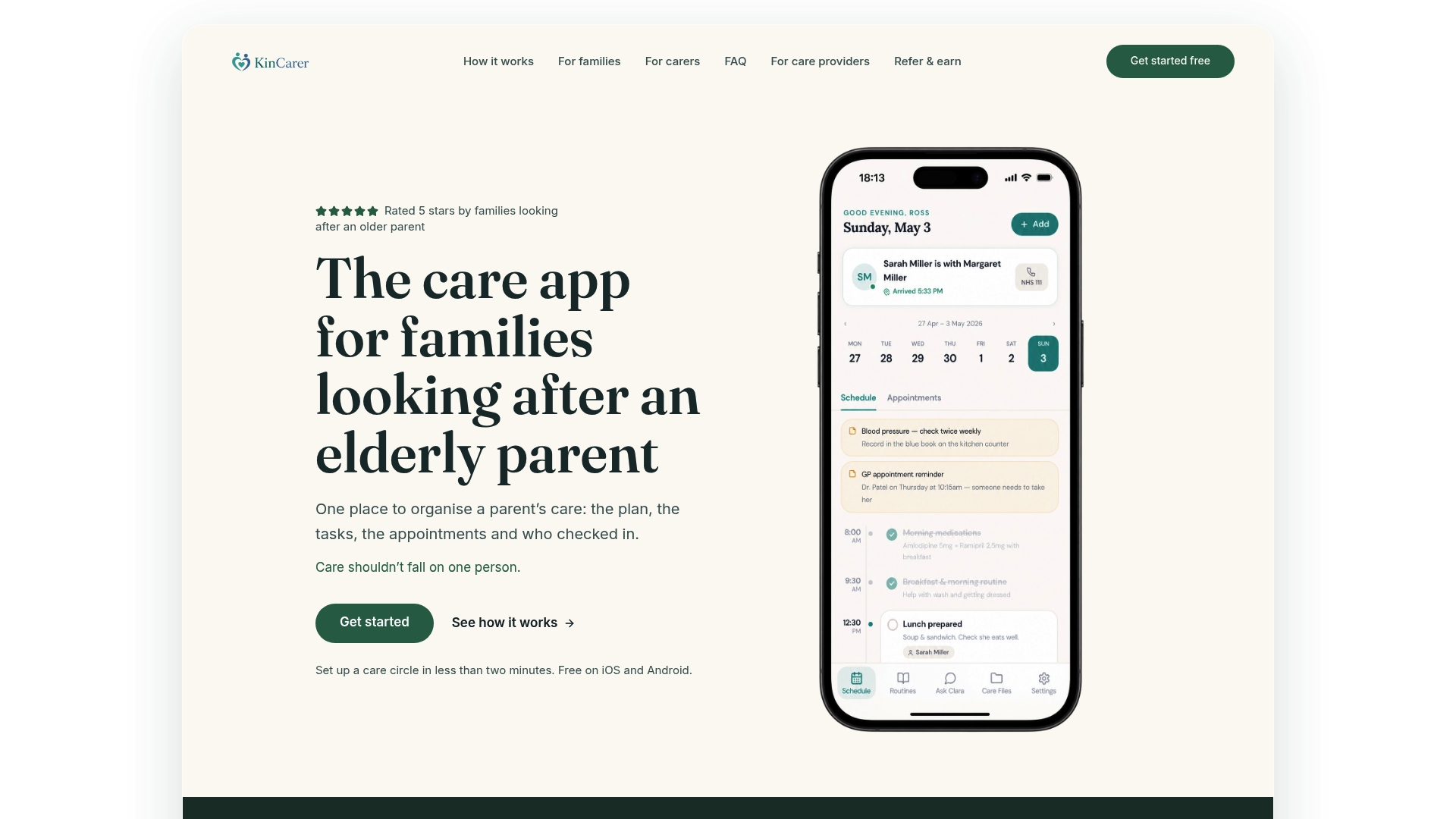
- Create a care circle and invite the relatives and any paid carer who need visibility.
- Add your parent’s medications and exact doses, so reminders and handover notes sit in one place.
- Log each dose in a handover note, so a missed dose is visible to the family rather than going unnoticed.
Families can start with the 14-day free trial, and care organisations or larger family networks coordinating paid support can check KinCarer for organisations for partnership options. One subscription covers everyone you invite, so the whole circle works from the same record.
This article is general information, not a substitute for advice from a qualified doctor. Consult a qualified healthcare professional about your own circumstances before acting on anything here.
FAQ
What is the best type of app for a family coordinating medication?
A shared care app with care circles, handover notes and role-based access works better than a single-user pill tracker when more than one person is involved. Look for acknowledgement flags and a visible history rather than just a basic alarm.
Can a paid carer or home care agency worker use the same app as the family?
Yes, most shared care apps, including KinCarer, allow families to invite a paid carer into the same care circle with limited access. This keeps the carer working from the same medication list and handover notes as the rest of the family, without giving them full account access.
How often should medication be reviewed by a GP or pharmacist?
People taking four or more repeat medicines are recommended to have a structured medication review roughly every 6 to 15 months. An app helps you prepare for that review by keeping an accurate, up-to-date medication list ready to bring along.
Is it safe to store medication information in an app?
Health information is treated as special category data under UK data protection guidance, so it needs an app with proper access controls, a PIN or biometric lock, and clear permissions. Avoid sending medication details through unsecured text messages or email instead.
Do medication reminder apps replace pharmacy dosette boxes?
No, electronic reminders and pharmacy dosette boxes solve different problems and often work better together. Specialist Pharmacy Service guidance notes that electronic reminders are most effective as part of a wider system, not as a replacement for pharmacist-prepared compliance aids where one is clinically appropriate.
Sources
- Structured Medication Review specification (NHS England)
- Reminding to take medicines: supporting adherence (Specialist Pharmacy Service)
- ICO guidance on data protection and workers’ health information
- Managing medication and health needs (Carers UK)