5 September 2026
Make Hospital Handovers Fast: UK Medical Document Storage for Carers
Set up one consent aware medical document store for UK carers. Use clear file names, pin meds and discharge summaries, and be ready for hospital handovers...
Make Hospital Handovers Fast: UK Medical Document Storage for Carers
The single most useful thing you can do this week is set up one shared, secure digital space for your parent’s medical letters, medication list and care notes, name files consistently, limit who can see them, and back everything up. A family app such as Kincarer builds this in from the start. Just remember: sharing still needs consent, and someone should always be able to reach the essentials in an emergency.
TL;DR:
Prioritize storing discharge summaries, current medication lists, allergies, and care plans, as they are frequently requested during appointments and transitions.
Use a consistent naming convention like YYYY-MM-DD_type_shortdesc_source for all files, and create specific folders for medication, letters, care plans, and legal documents.
Obtain explicit, written consent from your parent before sharing any medical records, and regularly review permissions to ensure compliance with NHS guidance.
Protect records with strong passwords, two-step verification, and scheduled backups, and avoid insecure email or sharing login credentials among multiple users.
Digitize paper letters with a smartphone app, saving files as PDFs or images, and add searchable text recognition to streamline future reference and organization.
Table of Contents
-
What documents should you gather first for medical document storage?
-
How do you name and organise files so anyone can find them fast?
-
What should you prepare for hospital discharges and appointments?
-
How long should you keep medical records, and what can you safely delete?
-
How do you share documents securely with a doctor or district nurse?
-
How do you manage years of accumulated medical records without losing your mind?
What documents should you gather first for medical document storage?
Start with the papers that get used the most, not the ones that feel official. A pile of old letters can wait; a wrong dose cannot.
Prioritise these:
-
Discharge summaries from any hospital stay, so nobody repeats a question already answered
-
Clinic and GP letters, especially anything mentioning a diagnosis or a treatment change
-
Current medication list with dosages, timings and administration notes (with food, avoid alongside certain drugs, and so on)
-
Allergies and adverse reactions, flagged clearly at the top of whatever you use
-
The care plan, covering routines, preferences and who to call for what
-
Advance care documents, such as any Lasting Power of Attorney for health decisions
Each of these earns its place because it gets asked for repeatedly, at appointments, by new carers, and during handovers. Government reporting on digital care records shows centralising this information cuts paperwork and helps carers see the full picture at a glance, rather than chasing five different people for the same answer.
How do you name and organise files so anyone can find them fast?
A simple naming convention beats a clever folder structure every time. If your sister can’t find the current medication list in ten seconds, the system has failed, no matter how tidy it looks to you.
-
Create four folders: Medication, Letters & Discharge Summaries, Care Plan & Contacts, Legal & Consent
-
Name every file the same way:
YYYY-MM-DD_type_shortdesc_source(for example2026-02-14_letter_bloodtest-results_gp) -
Pin or flag the items people reach for daily: the current medication list, emergency contacts and the latest care plan
-
Archive superseded documents rather than deleting them, in case a clinician asks for history
-
Review the flagged items monthly so “current” always means current
Copy that filename pattern exactly and you’ll never argue about which discharge summary is the newest one again.
Who can lawfully access mum’s medical records?
Health professionals need explicit consent from the person receiving care before they share confidential records with anyone else, including close family. Digital NHS guidance on information governance recommends recording that consent in writing wherever possible, and reviewing it periodically rather than assuming it still stands years later.
Practical steps that keep you on the right side of this:
-
Ask your parent, while they’re able to, exactly what they’re happy to share and with whom
-
Note any Lasting Power of Attorney for health and welfare, and keep a copy alongside the consent record
-
Register for GP online proxy access if your parent agrees, rather than relying on informal workarounds
-
Share only what’s needed for the task at hand, not the entire file, every time
Pro Tip: Write sharing preferences down while your parent can still discuss them clearly. A one-paragraph note agreed early avoids painful guesswork during a hospital crisis later.
Early, documented consent genuinely reduces confusion during a crisis. Families who leave this until a hospital admission often find themselves piecing together verbal permissions under pressure, which is exactly when mistakes happen.
What security and backup habits actually matter?
You don’t need to be technical to protect this information properly. You need a handful of habits, done consistently.
-
Use a strong, unique password for wherever documents live, and turn on two-step verification
-
Choose a reputable cloud provider or a family care app with recognised security practices, rather than a shared drive with one login for everyone
-
Keep a short, current emergency summary (allergies, medications, primary contact) somewhere accessible offline too, in case the internet or the app is unreachable
-
Back up on a schedule, not “whenever someone remembers”
-
Never email sensitive scans through an unsecured personal account, and never let four people share one login
Pro Tip: Put the emergency summary as the first item in whichever folder or app you use. In a stressful moment, nobody wants to scroll.
How do you turn paper letters into useful digital files?
A smartphone scanning app is usually enough. A dedicated scanner helps if you’re digitising years of paperwork in one sitting, but for ongoing letters, your phone camera does the job.
-
Save documents as PDF; save photos of medication boxes or wounds as JPEG or PNG
-
Use the scanning app’s automatic crop and rotate, then check it manually, wonky scans are hard to read later
-
Turn on OCR (text recognition) if your scanner or app offers it, so files become searchable, not just images
-
Name and date the file immediately, using your agreed convention, and add a one-line note (“dose increased after dizzy spell”)
-
Batch-scan in one sitting when you’re catching up on a backlog, and photograph medication labels flat and well-lit so dosages are legible
How does a family care app help beyond a shared folder?
A folder stores files. It doesn’t tell anyone a new letter has arrived, remind a sibling to renew a prescription, or show who last checked the medication list. That gap is where a shared cloud folder quietly breaks down, and where a purpose-built app closes it.
A shared care circle app is built around a shared care circle rather than a static drive. Family members and invited paid carers can:
-
Store and organise medical documents alongside tasks, appointments and check-ins
-
Get medication reminders instead of relying on memory
-
Leave handover notes so context isn’t lost between visits
-
See an audit trail of what’s been updated and by whom
-
Ask Clara, the built-in assistant, to search or summarise information already stored in the circle
Clara does not give medical, legal or clinical advice. She helps you find and understand what’s already there.
| Everyday situation | How it plays out with a shared circle |
|---|---|
| GP follow-up after hospital | Discharge summary is already shared with whoever’s attending |
| New carer starts a visit | Current medication list is pinned and visible immediately |
| Sibling asks “what’s changed?” | Handover notes answer it without a phone call |
Evaluations of digital social care records found that mobile-first design, family portals and prompts reduce paperwork and give relatives real reassurance, though what’s offered varies between providers.
What should you prepare for hospital discharges and appointments?
Transitions are where good record-keeping pays off most, and where its absence causes the most stress. Build a hospital handover pack in advance, then you’re not assembling it at 11pm in A&E.
Include:
-
Current medication list with dosages and timings
-
Known allergies and adverse reactions
-
The most recent discharge summary or clinic letter
-
Primary contact details, including anyone holding Power of Attorney
Share it electronically ahead of an appointment where you can, rather than handing over a phone at the desk. Government findings on digital care records suggest centralised records reduce admin time and improve continuity between care settings, which matters most exactly when a patient moves from hospital to home.
Show clinicians what’s clinically relevant. Keep financial details, legal documents beyond the LPA, and unrelated personal notes out of what you hand over, there’s no need to share everything just because it’s stored together.
What’s a realistic weekly routine for keeping this current?
Five steps get you started:
-
Gather the priority documents listed earlier
-
Create your four folders
-
Add an emergency contact card and the current medication list
-
Invite one other family member so you’re not the only person who knows where anything is
-
Set a backup schedule and confirm it’s actually running
After that, a light weekly check (has a new letter arrived? has the medication list changed?) and a monthly one (is consent still current? is the backup working?) keep things reliable without becoming another chore. When responsibility passes between family members, a short handover conversation, not just a login, prevents things quietly slipping.
How long should you keep medical records, and what can you safely delete?
There’s no single legal deadline that tells a family exactly how long to keep every letter, and that’s often more reassuring than it sounds, it means you have room to be sensible rather than rigid.
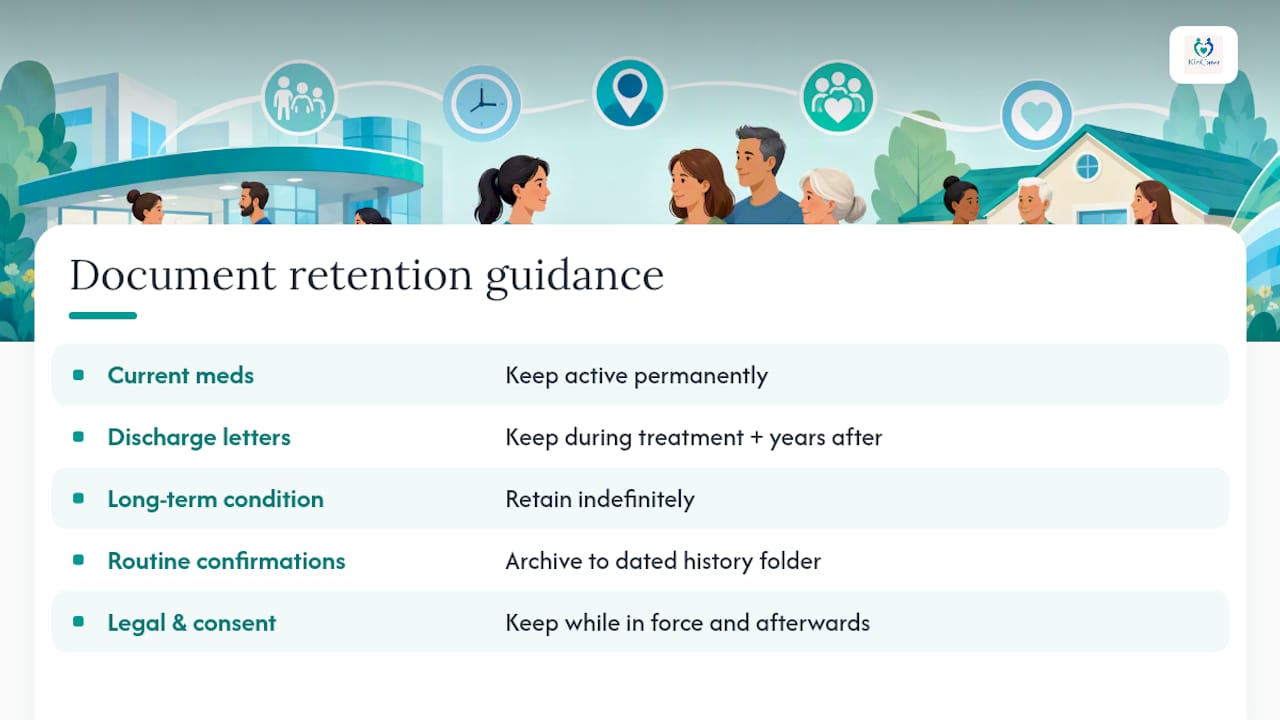
As a working guide, keep the current medication list and allergy information permanently updated, never archived while your parent is still receiving care. Discharge summaries and specialist letters are worth keeping for the duration of ongoing treatment and for several years afterwards, since a new clinician may ask about a condition treated years earlier. Anything tied to a long-term or chronic condition is worth retaining indefinitely, given how often past treatment history informs future decisions.
Documents that can reasonably be archived rather than kept front and centre include routine appointment confirmations, superseded prescriptions once a new one is confirmed, and older letters that have been fully superseded by a more recent summary covering the same information. Archiving, moving something out of the active folder into a dated “history” folder, is different from deleting it. Clinicians occasionally ask about care from years back, particularly around a new diagnosis that might connect to something earlier.
Legal and consent-related paperwork, including any Lasting Power of Attorney documentation, should be kept for as long as it remains in force, and ideally for a period afterwards too, since questions about historic decisions can resurface. If you’re ever unsure whether something has a formal retention requirement attached (this occasionally applies to certain legal or benefits-related paperwork rather than clinical letters), the safest approach is to keep it rather than remove it, storage space costs you far less than losing something you needed.
How do you share documents securely with a doctor or district nurse?
The safest sharing method depends on what you’re sending and who’s receiving it, but a few principles hold across most situations.
Avoid sending scans of medical letters through standard, unencrypted personal email when the content includes sensitive health information, this is one of the “unsafe habits” worth actively avoiding, not just a minor convenience trade-off. Where your parent’s surgery offers an NHS online proxy access service, use it, since it’s built specifically for this purpose and sits within the same consent framework already covering your parent’s care.
A family care app that lets you share a specific document, rather than an entire folder, with a specific person is generally a better fit than email for day-to-day sharing. It keeps a record of what was shared and when, which matters if a query comes up later about whether a GP received something. If you’re printing or handing over a physical copy at an appointment, that remains entirely reasonable, paper hasn’t stopped being useful just because digital exists alongside it.
Whatever method you choose, share only the specific document relevant to that appointment or query. A GP asking about a recent fall doesn’t need the full five years of unrelated letters, and sending everything “just in case” makes it harder, not easier, for a clinician to find what matters.
How do you keep stored records accurate over time?
A record store that’s slightly wrong is arguably worse than no record store at all, because people trust it. The most common failure isn’t losing documents, it’s letting the medication list quietly drift out of date while everyone assumes someone else updated it.
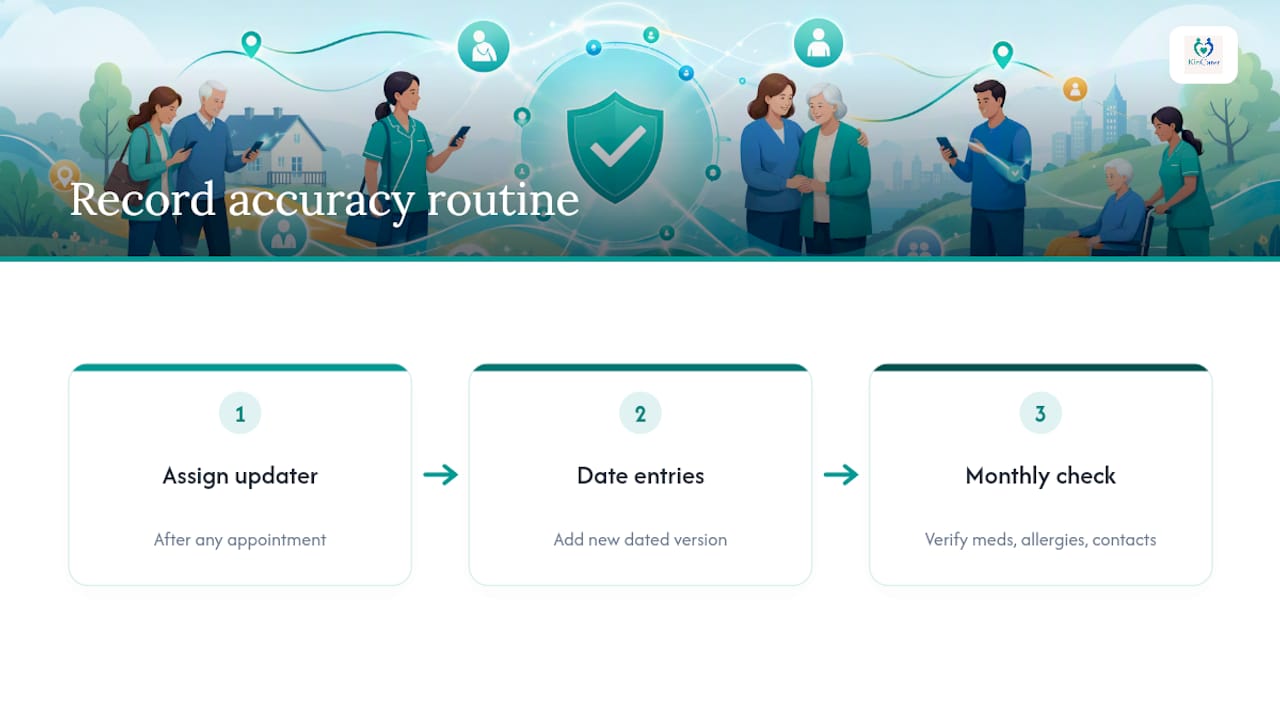
Assign the update, don’t leave it ambient. One person (or one rotating person, with a clear handover) should be responsible for updating the medication list immediately after any GP appointment or medication review, not “at some point this week.” Build a two-minute habit: after any appointment, whoever attended updates the file before doing anything else, while the details are still fresh.
Date everything, and don’t overwrite. When a medication changes, add the new version with today’s date rather than editing the old entry, so anyone can see what changed and when. Research on carers acting as informal care coordinators points to something easy to overlook: the most valuable record isn’t just that a dose changed, but who authorised it and why. A one-line note (“GP reduced dose after reported dizziness, 14 Feb”) preserves context that a bare number never will.
Set a recurring accuracy check, monthly is usually enough, where whoever’s responsible confirms the medication list, allergy record and emergency contacts all still match reality. It takes minutes and catches drift before it causes a problem at an appointment.
How do you manage years of accumulated medical records without losing your mind?
Volume creeps up faster than families expect. Two years into caring for an ageing parent, what started as a handful of letters can become dozens of documents, and the shared folder that once felt tidy starts to feel like clutter.
The fix isn’t a better filing system, it’s a stricter one. Keep only two tiers: active (anything relevant to current treatment or an upcoming appointment) and archive (everything else, dated and searchable but out of the way). Move documents to archive as soon as they’re superseded, don’t let “just in case” thinking keep everything permanently active.
Lean on search rather than browsing once volume grows. If your naming convention has been consistent, searching for “2025 discharge” or “medication” surfaces what you need far faster than scrolling folders. This is where a tool with built-in search, including an assistant that can summarise what’s stored, saves real time compared with a plain cloud drive where finding anything means opening files one by one.
Do a light annual clear-out. Once a year, archive anything more than two years old that’s been fully superseded, and double check nothing genuinely current has drifted into the archive by mistake. Research from the Joseph Rowntree Foundation on carers’ informal project management role points to a real pattern: the families who cope best with growing volume are the ones who prune regularly, not the ones who try to keep everything visible all the time.
Why a shared store matters more than it looks like it does
Every family I’ve spoken to about caring for an ageing parent tells some version of the same story: the exhausting part wasn’t the caring itself, it was answering the same question three times to three different relatives. That repetition, more than anything clinical, is what wears people down.
A shared, well-named, consent-aware store doesn’t remove the emotional weight of caring for mum or dad. It does stop one person carrying the entire administrative load alone, and it stops a crucial detail getting lost in a WhatsApp thread from three weeks ago. Start small. Pick five documents, name them properly, invite one other person, and let that be your single source of truth from day one.
— Kincarer
Put this guide into practice with Kincarer
Reading a checklist is one thing. Actually setting up a shared, consent-aware store while juggling everything else caring for a parent involves is another, and that’s precisely the gap Kincarer is built to close. Instead of a plain cloud folder that nobody remembers to check, Kincarer gives your family a shared care circle where documents, medication reminders, appointments and handover notes all live in one searchable place, with Clara on hand to summarise what’s already there when you don’t have time to scroll.
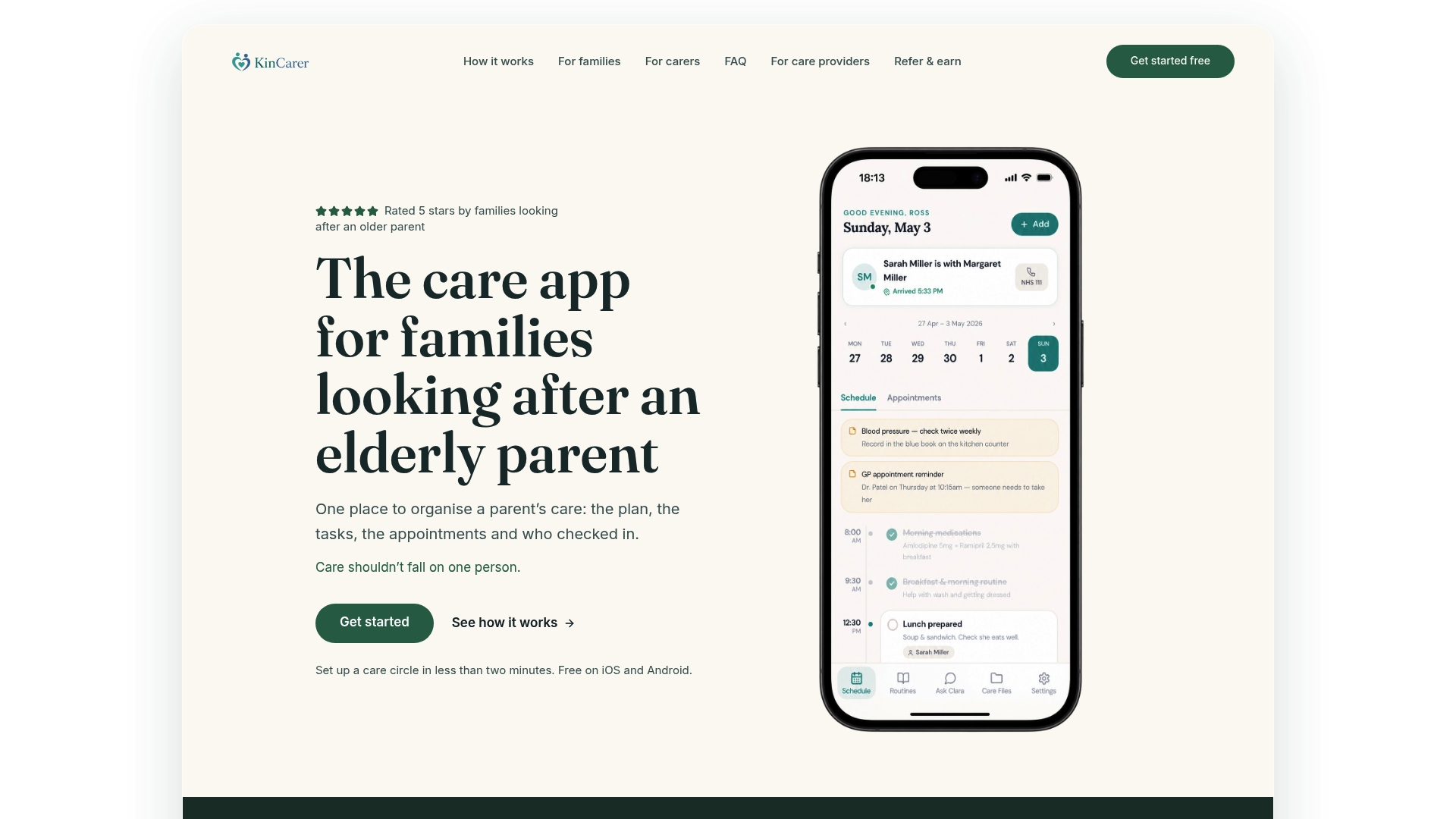
Map the checklist above straight onto the app: create your care circle, add the current medication list and one priority document, then invite a sibling or another relative so you’re no longer the only person who knows where anything is. If a paid carer visits regularly, they can be invited too, so everyone works from the same information instead of five different versions of it. Start with the free plan on the Kincarer app, set up your first care circle this week, and see how much lighter the admin side of caring feels once it’s not all sitting with one person.
Sources
-
Research summarising carers’ coordination role and the importance of central, accessible records
-
Moving in circles: supporting carers navigating the care system - JRF
FAQ
What’s the best way to start medical document storage for a parent?
Gather the essentials first, discharge summaries, current medications, allergies and a care plan, then put them in one shared, password-protected space rather than spreading them across email and paper.
Do I need consent to store or share mum’s medical letters?
Yes. Health professionals need explicit consent before sharing confidential records, and it’s worth recording that consent in writing and reviewing it periodically, as NHS guidance recommends.
How long should I keep old discharge summaries and letters?
Keep anything tied to an ongoing or chronic condition indefinitely, and archive (rather than delete) routine or superseded letters for several years, since clinicians sometimes ask about earlier treatment.
Can a family app replace a plain cloud folder for storing medical documents?
It can do considerably more. A family care app adds medication reminders, handover notes and searchable storage inside a shared care circle, rather than just holding files with no context.
What should I never do with sensitive medical scans?
Avoid sending them through unsecured personal email or sharing one login between several family members, both habits make it far easier for sensitive information to end up in the wrong place.
Keywords: medical document storage, healthcare document management, secure medical records storage, cloud storage for medical documents, electronic health record storage, how to store medical documents securely, family medical records app, best medical document organizer, organize medical documents, category:care-planning